questfox.news is now online
Posted: 24. April 2021 Filed under: Uncategorized Leave a commentWe are trying to seperate the domain landscape of questfox a little.
Since 2020 the website to get in touch with us is available under www.questfox.online
The news blog is available under www.questfox.news
And the one and only questfox tool remains available under www.questfox.com/admin.
How to manipulate fonts in CSS with questfox
Posted: 24. April 2021 Filed under: Uncategorized Leave a commentIt is possible to use different fonts in a questfox survey.
If you have a corporate font that is not publicly available you should talk to your representative to help install this font on the server.
Public fonts:
If you plan to use a font out of the variety that Google is offering in the goolge font project we recommend to chose a font from this website:
Import font on the fly from google servers
/*Import of font into project */
<style>
@import url(‘https://fonts.googleapis.com/css2?family=Satisfy&display=swap’);
</style>
/*Definition of font for your project */
body {
font-family: ‘Satisfy’, sans-serif;
}
How to manipulate the question text on top of the question?
.questionText > span > p{
font-size: 1.5em;
font-weight: 600;
}
/*Definition of font */
body {
font-family: ‘TeleNeo’, sans-serif;
}
CSS Selectors in questfox
Posted: 24. April 2021 Filed under: Uncategorized Leave a comment- There are two ways to affect the text layout of questfox projects
A) Definition of CSS on client area level (-> Branding)
B) Definition of CSS on project level (-> Project characteristics)
- All text elements in questfox can be modified via CSS
- There are certain CSS selectors for the various text elements in questfox
- Some text elements share the same CSS selectors
- Various properties can be applied
- A typical questfox project with different question types and decision trees demands up to 16 different CSS selectors
How to format the text underneath indicating Imprint and Data Security Rules
| CSS selector: .branding_sub_text Effect: Defines the small branding text on the down right side of the project window | CSS code example |
 | .branding_sub_text { color: #022D61; font-size: 1.2em; font-weight: bold; text-align: left; } |
CSS for Analytic Hierarchy Process (AHP) / Decision Tree
The AHP is a very specific idea inside of questfox. Following the algorithms of Thomas L. Saaty we developed out own approach of how to ask questions in the pairwise way.
| CSS selector: .ahp_context Effect: Defines the title text of a decision tree question | CSS code example |
 | .ahp_context { color: #022D61; font-size: 1.2em; font-weight: bold; text-align: left; } |
| CSS selector: .ahp_contextDetail Effect: Defines the description text underneath the title of a decision tree question | CSS code example |
 | .ahp_context { color: #022D61; font-size: 1.2em; font-weight: bold; text-align: left; } |
| CSS selector: .ahp_question Effect: Defines the question text of a decision tree question | CSS code example |
 | .ahp_question { color: #022D61; font-size: 1.2em; font-weight: bold; text-align: left; } |
| CSS selector: .ahp_versusText Effect: Defines the versus text of a decision tree question | CSS code example |
 | .ahp_versusText { color: #022D61; font-size: 1.2em; font-weight: bold; text-align: left; } |
| CSS Selectors #ahp_option_left #ahp_option_right Effect: Defines the versus text of a decision tree question | CSS code example |
 | #ahp_option_left { color: #1d537f; font-size: 1.4em; font-weight: bold; text-align: right; } #ahp_option_right { color: #1d537f; font-size: 1.4em; font-weight: bold; text-align: left; } |
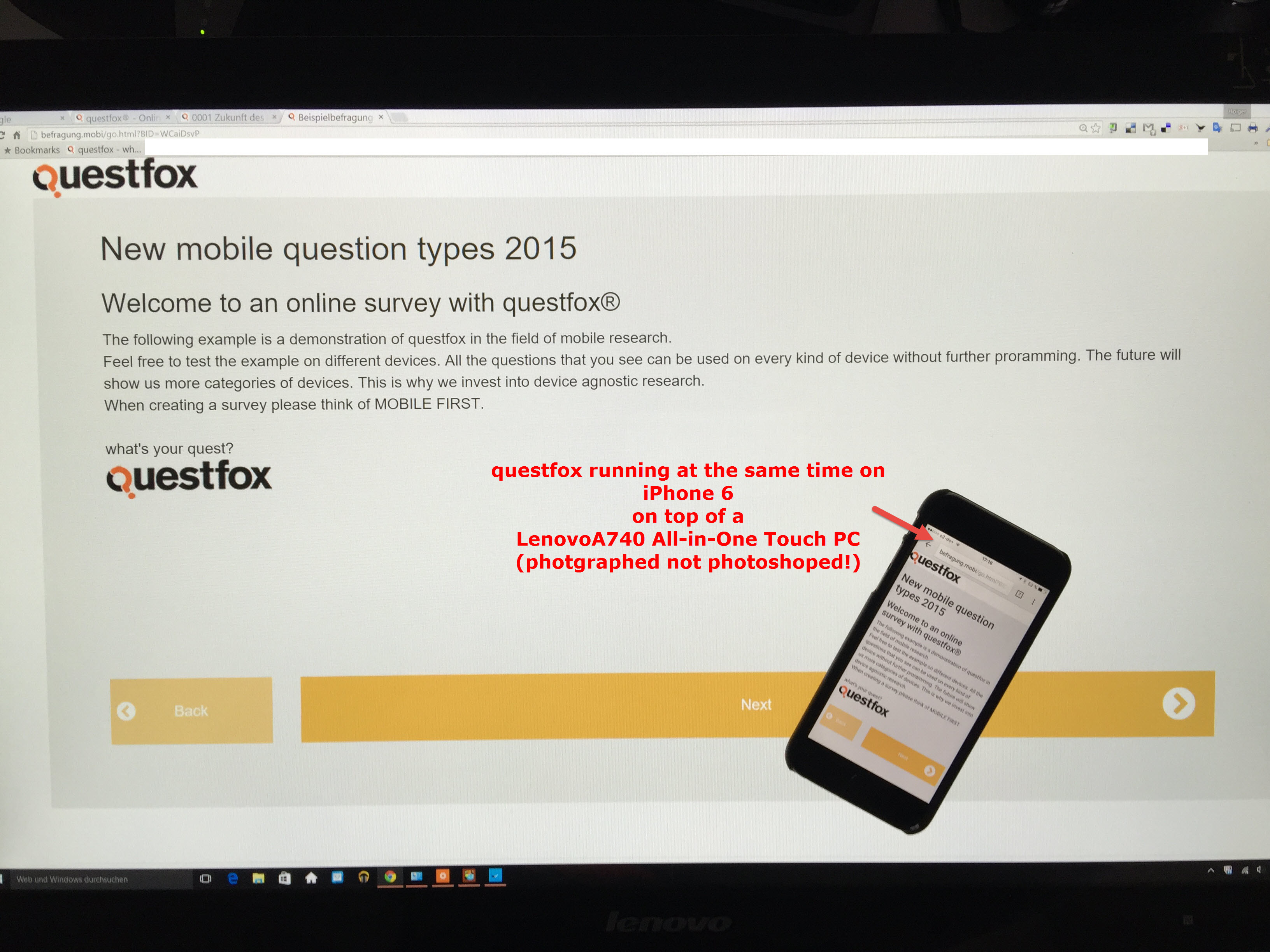
Befragung.mobi shows you the device agnostic world of questfox
Posted: 24. April 2021 Filed under: Uncategorized Leave a commentWe are about to launch the mobile device agnostic version of questfox.
Soon you can experience questfox on the biggest or smallest screens without changing anything.
questfox will be the professional market research solution which contains.
Using your own font in questfox
Posted: 17. April 2021 Filed under: Uncategorized Leave a commentFonts can support or destroy your research project
It is possible to integrate your own font into a research project.
Make sure that your font makes sense in research terms. Sometimes it is also helpful to not disclose who is asking by exactly not using your own corporate identity elements.
There are several ways to do that.
Importing Webfonts into questfox
You can integrate fonts which allow the using via internet. Please see the description of how to do that on fontawesome.
Import of Google Webfonts into CSS is explained here:
https://www.w3docs.com/snippets/css/how-to-import-google-fonts-in-css-file.html
Inside of the google fonts there are different ways of how to import a font into your project.
@import url(‘https://fonts.googleapis.com/css2?family=Lora&display=swap’);
Using your own non-public font
A lot of companies do have their own corporate design font. In case you plan to use that font this is the way:
- Make sure that you have the right to use the font.
- Install the font on an accessible server
- Integrate the font into the questfox project CSS
Example Official Berlin Font “Berlin Type”
Sometimes fonts are published for the use. Make sure that you do cover the licence agreement when using this font for market research.
We downloaded the font of the Berlin Senate here:
https://wir.berlin/fileadmin/downloads/Wir.Berlin_Schrift.zip
The font is installed on the questfox server now.
You just have to implement the following code into your project’s CSS
body {
font-family: ‘WirBerlin’, arial;
}
In case some computers/phones are not able to use this font there is a second font defined that should be available on any device (arial in this case).
Have fun creating more beautiful looking questionnaires.
questfox server now operating on german premises
Posted: 26. March 2021 Filed under: Uncategorized Leave a commentThe GDPR rules are already implemented into questfox for years. But still more and more german clients ask about the server infrastructure as they need to include this into their contracts.
From today on questfox.com is running on a Microsoft Azure server system located inside of Germany.
It does not change anything for the user, but for some people it just feels better. 😉
Independent from this step we continue to be devoted to the highest standards of data security. After 15 years of operating the questfox system we know that the user itself is the risk category no. 1. So keep your passwords secure and never share your logins with anyone.
NEW Maths function in questfox
Posted: 8. March 2021 Filed under: Uncategorized | Tags: missing values, qf_avg, qf_sum, research mathematics Leave a commentMathematics is clearly defined for centuries now. questfox is offering you a set of mathematical operations since the beginning of our development from the standard toolbox of database manipulation.
See our special questfox functions under https://questfox.news/2021/03/08/how-to-calculate-with-missing-values-in-questfox/
Besides those questfox specific procedures we are using a bunch of functions to interact with mathematics. The Jace.NET framework is now used to support your calculation inside of questfox. More info under https://github.com/pieterderycke/Jace/wiki/Standard-Functions
Here is the list of functions so far to be used inside of questfox calculations.
What do you have to do?
Syntax check from ln to loge
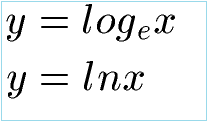
Please check your questfox project for the correctness of the syntax. For example: The formerly implemented function ln is now called loge. You now need to switch to this new version in order to perform those calculations in the future with questfox.
How to calculate with missing values in questfox
Posted: 8. March 2021 Filed under: Uncategorized Leave a commentSometimes a question is skipped or not even shown to a respondent. This creates a missing value (e.g. -77). If your use standard mathematical procedures for a list of respondents, the missing values will destroy your calculation. In order to adress this problem in a live environment we developed our own approach to handle this. We are adding functions to this world of math by creating our own formula for the market research world being able to create a sum or an average respecting the fact, that someone did not see or answer a question. Our operations for the so called “missing values” help you to analyze correctly long before you can do similiar things with sophisticated tools like SPSS. See our idea of how to treat missing values https://questfox.news/2021/03/08/missing-values-in-market-research-with-questfox/
When you then want to calculate with a variable that contains “missing values” you will face trouble in the analysis. questfox has two special functions to take that into account.
The syntax is described here
| qf_avg() | Returns the average value of the input values (separated by comma) and excludes missing, not seen and not answered values. qf_avg(@81c4af14-4857-49b8-9dd7-449b33e73e60@ , @7151c6d2-48af-4619-8318-39b62aa99b07@) |
| qf_sum() | Returns the sum of the input values (separated by comma) and excludes missing, not seen and not answered values. qf_sum(@81c4af14-4857-49b8-9dd7-449b33e73e60@ , @7151c6d2-48af-4619-8318-39b62aa99b07@) |
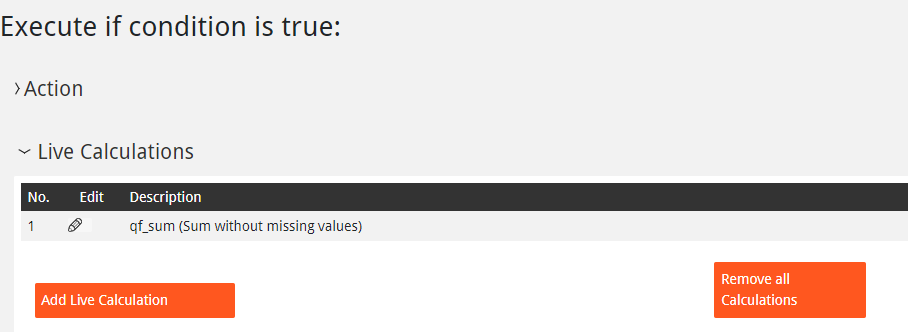
We suggest to ad an invisible number inside the question page and calculate right into that hidden variable. You can later use this value as a trigger for questlogix or to show this value live to the respondent.
Missing values in market research with questfox
Posted: 8. March 2021 Filed under: Uncategorized Leave a commentThe phenomenon is not recent. People do not answer to questions. If someone does not answer to a question we are talking about so called missing values.
Also see the Wikipedia article: https://en.wikipedia.org/wiki/Missing_data
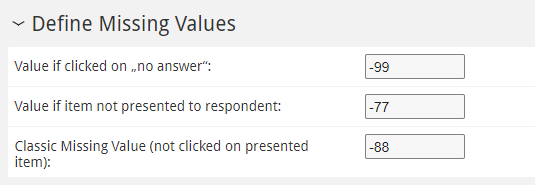
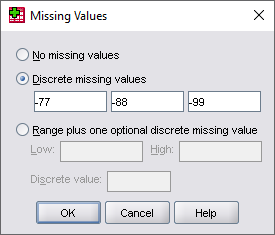
questfox knows 3 different kinds of missing values.
Missing value -99
someone clicked explicitly on “no answer”
Missing value -77
the question was not even shown to the repsondent (due to skipping/hiding procedures)
Missing value -88
classic missing value meaning the question was shown, but the answer was not mandatory so the respondent could click through
A good idea is to make someone click on each question, but this means that you will have to add the option “no answer / do not want to tell” to every answer where you require a mandatory click. Even if you do some of the questions or items will not be shown and therefore create a Missing value (-77).
Why is it negative with two digits in questfox?
The answer is pretty simple. If you use a scale from 1 to 5 and your default missing value is 9 (as some of us learned in their statistics class), you may not realize that you have an issue with missing values in your report. In the questfox default you would easily see that something is wrong in your definition of missing values.
These three default values are assigned to every question type and can be changed under “Define Missing Values” in the edit answer section.

When using SPSS these values can be defined as discrete missing values.
Now it is up to you if you can force your population into answering all the questions.
questfox maintenance 1st of March 2021
Posted: 1. March 2021 Filed under: Uncategorized Leave a commentThe world is turning faster than ever. In order to cope with this we have to work on our servers as of today the 1st of march 2021.
The servers are still available but some data intensive services like export or analysis may make you wait longer than normally.
Sorry, for any inconvenience but you will feel a more powerful version of questfox after the maintenance procedures.
 questfox News