questfox update planned for July 30th
Posted: 14. July 2017 Filed under: Uncategorized 1 CommentDear questfox users around the world
we have some good news for all questfox users, as we are updating some basic infrastructure settings of questfox to cope with the fact that more and more research goes mobile.
Together with those structural updates, we will share the news about an incredible new feature set for mobile research with you soon. questfox will be the first tool to offer something big to the users.
The update is planed for sunday 30th of july. Despite the fact that you should not work on a sunday anyhow, please be prepared for some interruptions in our service to the questfox administrators. The questionnaire level to participants should not be touched by these updates. Only the registered questfox users might face some issues during that day.
By the way: Happy Birthday pangea labs. The developer team of questfox founded the company 11 years ago on July 14th 2006. We will be a revolting teenager soon and hope to never grow adult.
questfox feature alert: Integration of third party questionnaire data
Posted: 18. May 2017 Filed under: Uncategorized Leave a commentMore and more users become fans of the questfox Living Report features. Some of our clients regret that they cannot use this function with survey data that has been created outside of questfox. So we were asked to make the integration of third party software interviews which were conducted outside of questfox possible.
After several innovations we now offer this opportunity to all our users without the need to contact a database expert. Anyhow it is a little tricky to start an import of external data into your questfox project. We try to describe the steps here:
- Generate “empty” interviews in your project
In order to be able to import data, questfox needs to reserve this empty space for the incoming data before importing. We use a little detour to make this happen.
Use the simulation function and click Simulate without adding data to ON.
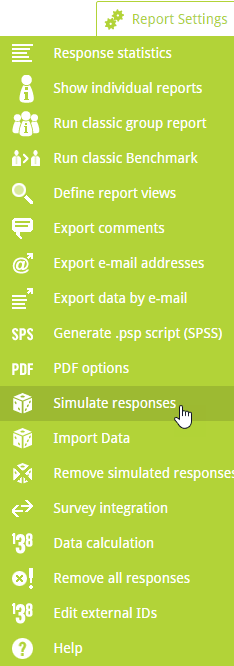
Define the amount of empty interviews that you would like to create and switch Simulate without adding data to ON.
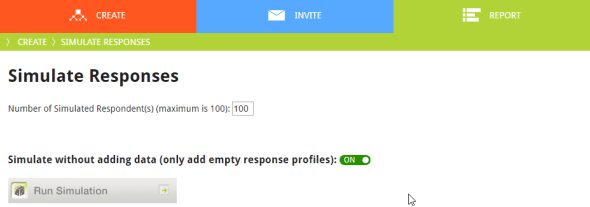
Press Run Simulation. You will receive an email to your registered address once this background process is finished. - You now have the desired amount of empty interviews in your project. Before you can use the import functions you need to know the internal ID of your new empty interviews. To get then you have to export the data once.

- Combine your external data with the internal IDs that you receive from your export questfox file. You can either fill the empty field EXTERNAL RESPONSE ID with your data file ID or use the questfox INTERNAL RESPONSE ID (something like cbb5a7554057409dbf5d36904829efc5) to define a key to merge the incoming data.

- Use the Import Data function to combine the two approaches. See Details

As this procedure is really changing your data we suppose that you first create a copy of your project and try to work with that one. Please remember, that the IDs are different in every project.
questfox feature alert: PDF Upload as question type available in questfox
Posted: 30. March 2017 Filed under: Uncategorized Leave a commentquestfox is used by more and more people in more and more scenarios. One of the requirements of our clients was the opportunity to upload PDF documents during the survey process.
You can now implement the question type PDF upload and ask your respondents to upload a PDF. At the moment we allow a maximum of 10 MB for each upload. Surely there is no reporting on uploaded PDFs possible, but you can download the documents from each respondents case.
pangea labs screen backgrounds
Posted: 19. November 2016 Filed under: Uncategorized Leave a commentMore and more questfox users apply specific screen backgrounds for their surveys. We support this with some basic background templates.








#questfox feature update: Browser #Fingerprinting to prevent multiple participation from one participant
Posted: 17. November 2016 Filed under: Uncategorized 1 CommentIn times when people receive money in exchange for market research, the willigness to participate several times in a survey tends to be higher.
questfox now offers you a protection from multiple participation by using a browser fingerprinting technology. This option is meant to protect a project from unwanted multiple responses from one browser.
In questfox you can find the option under Project Settings.

Switch it on to protect your project from multiple responses from the same browser. Be aware that even the preview mode will not work anymore after you finished the survey yourself. The blocking of a survey will only be used after a survey was fully completed from that browser.
If a respondent opens the link with a different browser the fingerprinting mechanism would only work after the completion of this survey. To avoid those cases it would be helpful to hide the URL-Paramters in the browser (also under Project Settings).

Overall this feature is helpful to prevent spontaneous multiple participations. If user seriously want to cheat with you, this is only a weak protection. Anyhow we are happy to offer that feature to our users.
questfox is only storing that information for the sheer purpose of blocking people out who already took one specific survey. We are not using or sharing this information at any point during an interview or later.
If you want to find out more about Browser Fingerprinting here is a source where you can find out, how unique your visit to the internet is. https://amiunique.org/fp
Hiding the intro page in #questfox
Posted: 20. October 2016 Filed under: Uncategorized Leave a commentA little reminder of a nicely hidden, but sometimes useful feature. Adding &skipIntro=1 to any questfox link would leave out the first introduction page and make you jump right away into a question. While adding more information to the link you can also steer the respondent into a specific part of your survey.
&skipIntro=1 is all you have to attach to the link. You can still use the questfox link shortener and hide this info from people before sending out that link.
questfox mobile research app updated
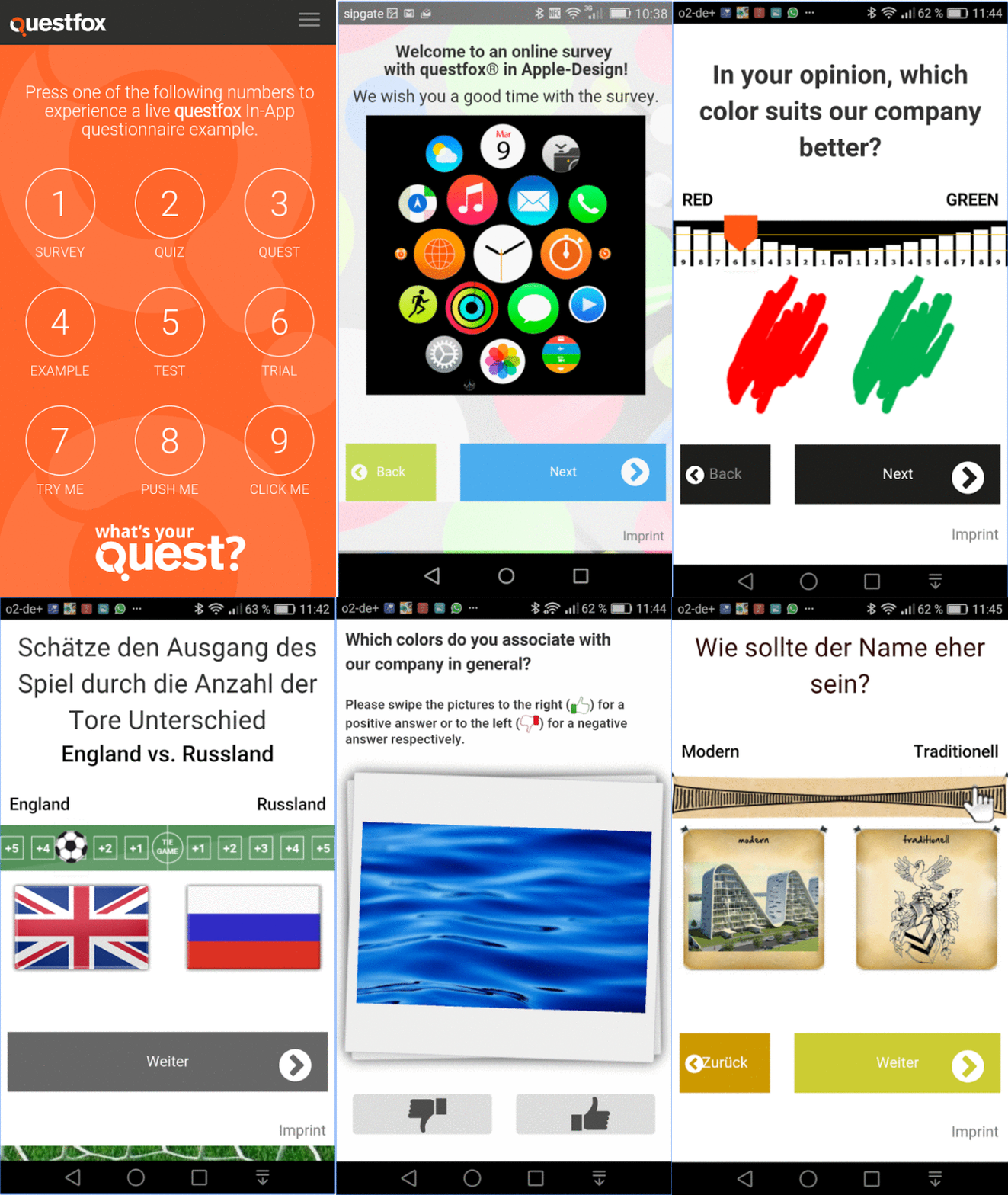
Posted: 14. October 2016 Filed under: Uncategorized Leave a commentWe are working on some updates of the questfox features. You can see some new examples of mobile in-app research
You can find the questfox mobile research app updated in the Google Playstore under
https://play.google.com/store/apps/details?id=com.phonegap.questfox&hl=de
#questfox feature alert: Auto-Next for Analytic Hierarchy Process in #questfox
Posted: 21. September 2016 Filed under: Uncategorized Leave a comment
After years of research and even a PhD about the idea of shorting complex Analytic Hierarchy Process questionnaires, we finally came up with a pretty simple and straight forward idea which is now implemented inside of questfox.
The NEXT Button does not need to be clicked anymore. A respondent may either click or swipe and let go the slider. We are still testing the effects on respondent’s behaviour and can already advise you to allow a BACK Button too.
Here is an example of someone going quickly through an AHP questionnaire powered by questfox:

If you want to play it live, here is a link for your test drive with questfox
Looking forward to see your projects speeding up in time (and quality).
questlogix re-direct dynamic data transfer into third party system with #questfox
Posted: 1. September 2016 Filed under: Technology, Uncategorized | Tags: Linktail, Re-Direct 2 CommentsAfter an interview is finished some projects require to transfer information into a third party system. A panel wants to know who did finish the interview. A CRM manager would like to see the NPS Score in his own system. questfox allows all of this with some interesting features of adding information to a re-direct link.
questlogix allows you to re-direct a person while transferring questfox data into another questfox project or into any other website that allows to receive data.
Open questlogix under Create Settings

Define a condition when this re-direct should occur. It can basically take place at any moment. The standard would probably be “at the end of the survey”
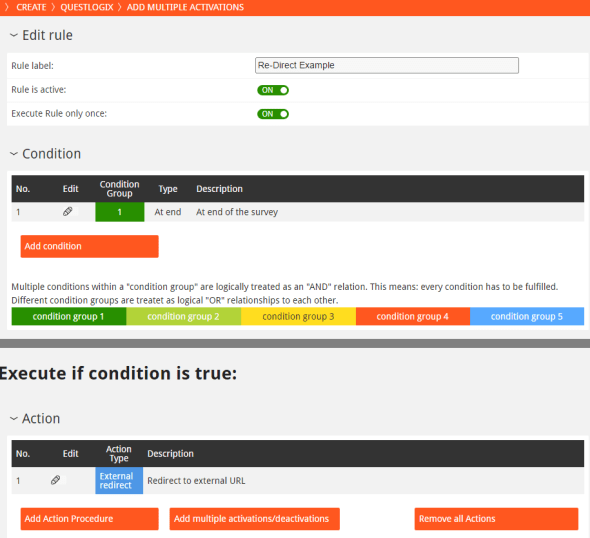
Define the Action Procedure as “Redirect to external URL“. Type in your URL and the respective linktails.
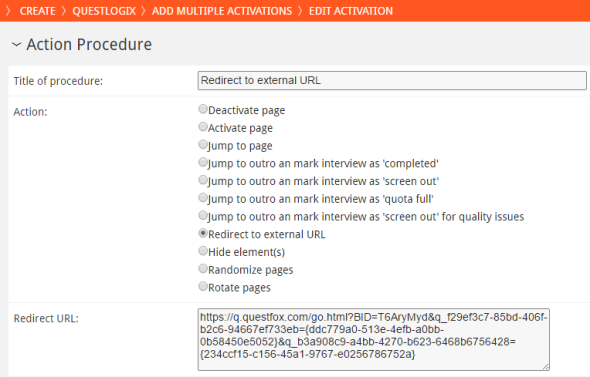
The example opens another questfox project and transfers two (first one is red, second is blue) into that new project. The link would look similar to this one:
https://q.questfox.com/go.html?BID=T6AryMyd&q_f29ef3c7-85bd-406f-b2c6-94667ef733eb={ddc779a0-513e-4efb-a0bb-0b58450e5052}&q_b3a908c9-a4bb-4270-b623-6468b6756428={234ccf15-c156-45a1-9767-e0256786752a}
Using this function you can also send one or several pieces of information into any kind of CRM System (e.g. Client ID plus Net Promoter Score). You only need to know the IDs of the receiving website.
In relation to the topic please also consider the posts about
Using variables inside a questionnaire like in serial letters #questfox
Magical Re-Direct Linktails in #questfox
Magical Re-Direct Linktails in #questfox
Posted: 1. September 2016 Filed under: Uncategorized 2 Commentsquestfox SaaS offers all functionalities to transfer data into questfox or to re-direct a person to a thid-party website with additional information to be used by the website owner. to interact with other websites

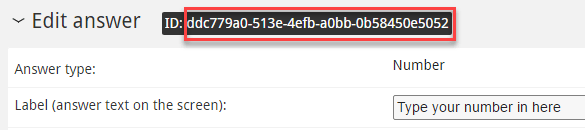
Add this ID to your link with a value behind.
Adding hidden information to your questfox project from the outside

Under INVITE you can add numerous unique links to questfox. The unique links can have additional so called linktails carrying additional information.
Just add &q_ and your question ID with the number that you are transfering (here: 666)
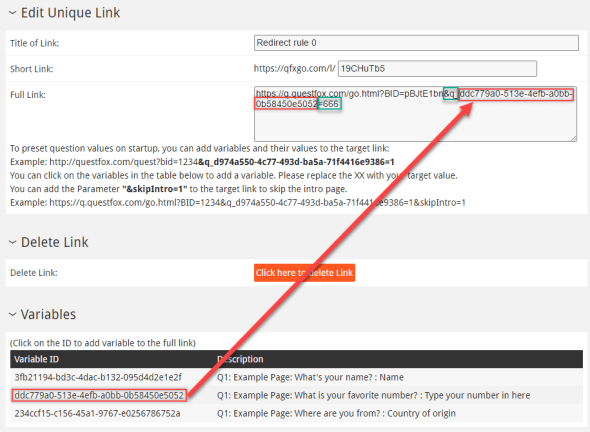
This number will be saved in the variable.
You can use this function to transfer customer IDs into questfox or to differentiate different website sources by giving each partner site a specific link which fills the question with a specific value.
Also see:
Using variables inside a questionnaire like in serial letters #questfox
questlogix re-direct dynamic data transfer into third party system with #questfox
 questfox News