Using variables inside a questionnaire like in serial letters #questfox
Posted: 1. September 2016 Filed under: Uncategorized 2 CommentsA simple example:
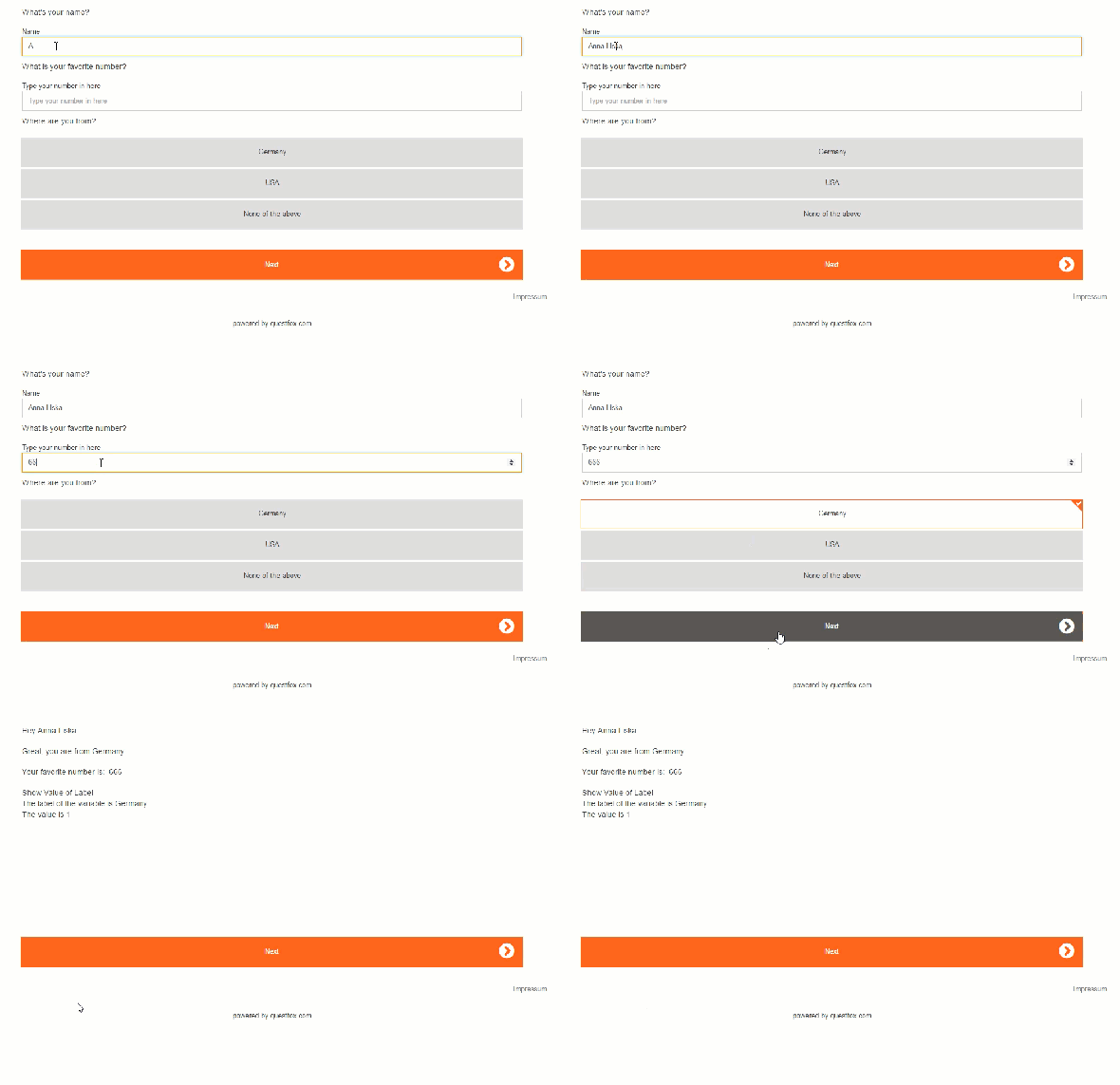
A single choice question is designed as follows:
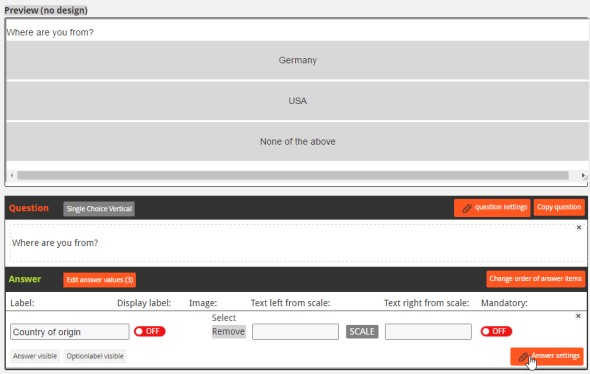
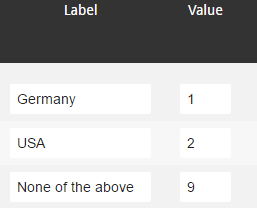
Label vs. Value
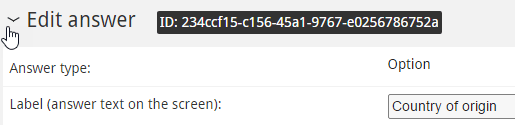
Finding the questfox ID of a question
If you want to use a questfox variable inside of questfox you need to find the questfox variable ID, which always looks complicated like 3fb21194-bd3c-4dac-b132-095d4d2e1e2f
Under Answer settings you can see the ID of that specific question

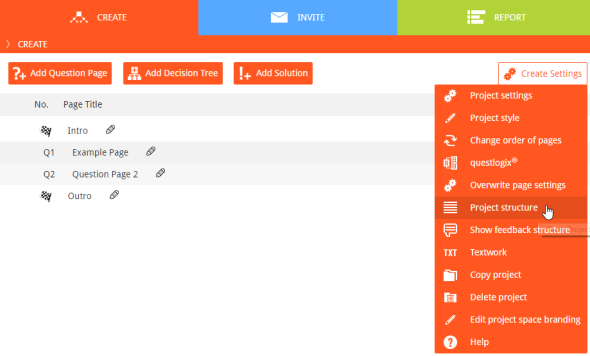
A list of all your variables and their respective IDs can be found under “Project Structure” and Show List of Variables.

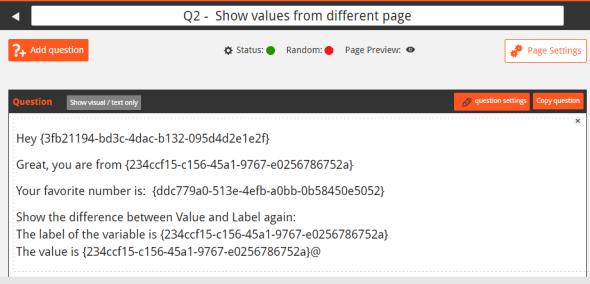
Adding IDs into the question part
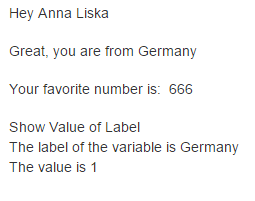
- The label of the variable is {234ccf15-c156-45a1-9767-e0256786752a}
- The value is {234ccf15-c156-45a1-9767-e0256786752a}@
Just put in those IDs into any kind of questfox question right into the question text.
Import external data into #questfox survey data
Posted: 10. August 2016 Filed under: Uncategorized 1 Comment
We happily announce the possibiliy to merge external data with response data from interviews inside of questfox. The function can be used to integrate customer data or non-responsive tracking data in combination with the incredible questfox living report features.
The function “Import Data” in the section REPORT allows you to assign additional data to your existing questionnaire data.
There are only two pre-requisite to merge a data file into questfox:
- A variable with the defined name of the input field has to be created inside of questfox. The ID of this variable becomes the name of the first row in your upload data.
- An identical key to merge the upload file is used in both data sets (questionnaire and import file)
How to use the data import function:
- Prepare the required empty questions in your questfox project of the kind of data you would like to import (text, number, single choice etc.). It is a good idea to use the first page of your project for this purpose. Make sure that the questions are hidden from the interview process.
- Prepare the upload data to communicate with questfox. Prepare a CSV file (comma seperated values), in which the first column contains the merging key data. The first row of your CSV file must contain the question ID of the prepared empty questfox placeholder (ID looks like this 6c50a15c-86ac-49b9-b7de-674a9a6a45bb; the list of IDs of your project can be found under CREATE – Settings – Project Structure – Show all Variables).
Your data structure should look like this prior to upload.
- Under REPORT – Report Settings click on Import Data
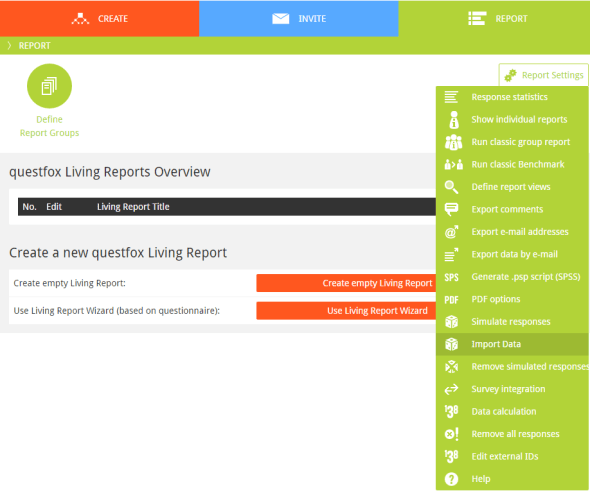
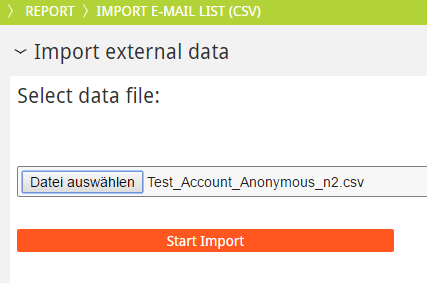
4. Select the file and press “Start Import”
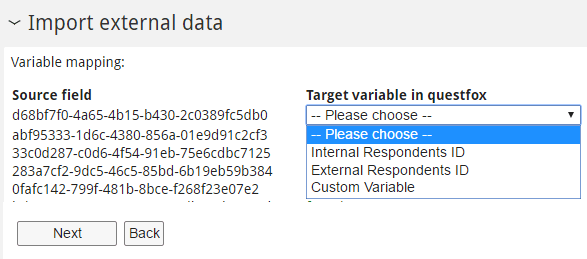
5. Select the Target variable in questfox to be matched with the external key (first row of your data set).
The key can be matched with an Internal Respondents ID, an External Respondents ID or a Custom variable of your questfox questionnaire.
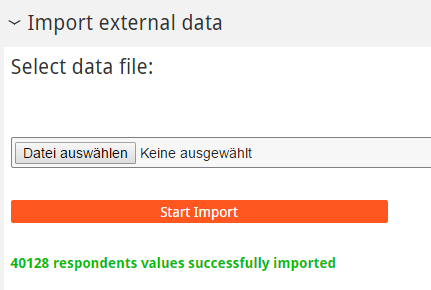
After clicking next the data is integrated. Depending on the filesize it may take even minutes before your entire data set is integrated. A success message will apear after a successful import.
The new functions will help you to generate more detailed insights of your questionnaire projects. Looking forward to see you progress with questfox. Make sure not to break any data security rules when using the import funtions.
#questfox mobile research app with #iBeacon technology
Posted: 5. July 2016 Filed under: Uncategorized Leave a comment
The new questfox mobile research app is supporting ibeacon technology.
iBeacon is a nearfield communication technology that allows to localize an individual in the field. The moment a person approaches an installed Beacon, a mobile push notification is send out to motivate the respondent to take a questfox survey.
The questfox mobile research app is a demonstration of this new approach for out-of-home research ideas.
Get your iBeacon ready questfox mobile research app for Android here:
https://play.google.com/store/apps/details?id=com.phonegap.questfox
More about the technology and order possibilities for your own beacons at estimote:
15% shorter interviews with questfox mobile version #seriousfun
Posted: 30. June 2016 Filed under: Uncategorized Leave a commentWe have implemented the questfox device agnostic version more than a year ago, still researching the ways of market research of the future.
Mobile questionnaires are still a problem for the industry as they are not following the quick pace of adoption to mobile devices of their user base. The non-mobile-optimized questionnaire takes some 10%-20% more time to be completed, resulting in higher costs for recruiting and incentives.
Inside of questfox you do not have to change anything to run your study on a mobile device. questfox does all the necessary adaptations for you. After running thousands of interviews we can proudly announce that our idea of a mobile version is very much appreciated by the interviewees, resulting in SHORTER interview times compared to the desktop versions.
Here is an example:
A questionnaire design to take 15 minutes of answering time resulted in:
- 1029 Seconds on Desktop/Laptop Version:
or Median: 17 Min, 9 Sec. (Mean: 18 Min, 19 Sec.) - 890 Seconds on Mobile Version:
Median: 14 Min, 50 Sec. (Mean 15 Min, 52 Sec.)
In other words: questfox can save you time and money with the mobile adaptions.
Still one problem of mobile research is not solved: The drop-out rate on mobile devices remains higher. It may be because of the very high competition of fun applications on one’s device. We need to cope with that in the future. Fun approaches do not care about market research issues. This is why our development acts under the label serious fun.
Rensis Likert would love questfox. Examples of animated scale examples for market research in questfox
Posted: 2. June 2016 Filed under: Uncategorized | Tags: Likert Scale, questfox, Scales Leave a commentThe Likert Scale is the origin of all rating scales. We have been using graphical scales for the last 10 years successfully. In the development of mobile research methods we see an even stronger need for graphical interaction.
The opportunities of questfox allow to use different scales with adapted sliders. The scale can be used with a mouse or with a touch event.
On mobile devices the scale is responsive, but the relative dimension of the scale stays the same.
To inspire you to create your own individualized scales we are sharing some animated examples of scales used with questfox.










0






Hoping to see more creative scales from the questfox community.
Thanks to Rensis Likert who is and always be the father of modern scaling. We guess he would appreciate some of our ideas.
https://en.wikipedia.org/wiki/Likert_scale
questfox mobile research App for Android available in Google PlayStore
Posted: 3. May 2016 Filed under: Technology, Uncategorized Leave a commentWe proudly announce the launch of the questfox mobile App for Android. The questfox app is showing you nine designed examples of mobile surveys designed with questfox.
We will continously change the examples to inspire you to create mobile first research approaches. There is no plan to sell this app because the serious companies already run their own apps successfully. This app is purely ment to show you how easy it is to integrate a device agnostic research approch into any kind of mobile app.

Startscreen pf questfox mobile App
The download is available under:
https://play.google.com/store/apps/details?id=com.phonegap.questfox
An iOS Version of the questfox mobile research app will follow in a few days.
#questfox feature alert: WYSIWYG
Posted: 9. March 2016 Filed under: Uncategorized Leave a commentquestfox is serving the needs of market research professionals as well as market research newbies. The bridge between the needs of the pros and those who are not really interested in details of research functions is not always easy to cope with.
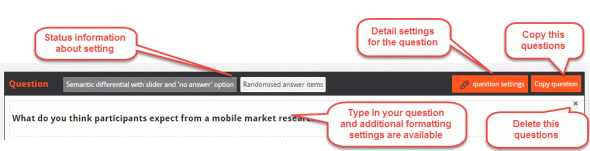
Happily we announce a development status that covers both needs at the same time. Inside of questfox you can now test the “What you see is what you get” function of setting up questions.
The basic needs of changing questions, items, scale texts and pictures all in one view are covered now. Just change those things and press SAVE.
The research professionals will still need to go for details of randomization or changing to individual scales and sliders and additional settings.
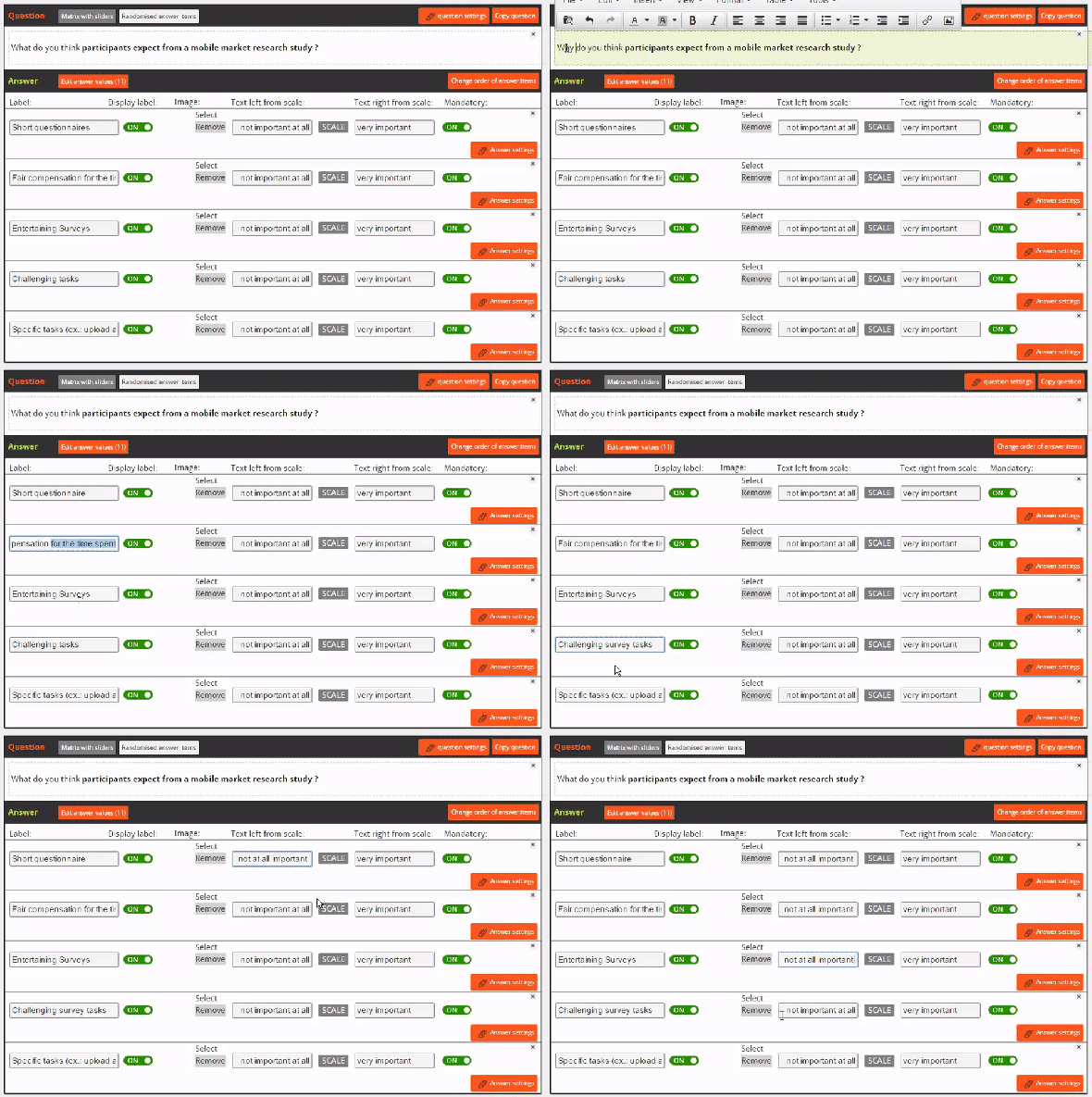
The question and item texts can be changed by typing in the text.
Additional settings are described underneath.
The answers and scale descriptions can be edited in the same way.
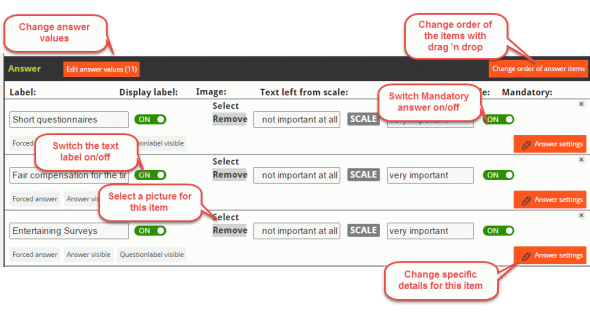
Do not forget to press save as these changes are only permanently in the system after pressing SAVE.
#questfox feature alert: Project Style Click Design
Posted: 18. February 2016 Filed under: Technology, Usability | Tags: Market Research, questfox, questionnaire design, respondent motivation, serious fun, UX Leave a commentquestfox questionnaires could always look better than the average online questionnaire out there. From today on it is much easier to create individually designed social interactions with questfox.
The new “Project Style” definitions do no longer require additional skills to make your research approach look beautiful or individual. Without any knowledge of CSS you can individually design background images, Next&Back buttons, interaction buttons and much more.
An example with very colorful backgrounds can be seen here:
The features are available under CREATE SETTINGS – PROJECT STYLE
#questfox feature alert: Living tables
Posted: 11. January 2016 Filed under: Uncategorized Leave a comment1. Copy to clipboard. 
2. Create a fresh Excel file and continue working 
We are happy to support the continuous usage of your tables with this step.
Feel free to test the function under this small example:
http://questfox.com/ar/n7uqoTei-22c179b74a9c4341b6a34f47f6808dd6
There are (or used to be) restrictions to the length of a file name in excel. Anyhow our plugin is still believing that the length is an issue. In case your report name is too long, the Excel file therefore cannot be generated directly. Sometimes it also struggles with special characters like @äüä# in the filename.
questfox feature alert: Photos – Qualitative studies in quant online research projects with questfox
Posted: 19. November 2015 Filed under: Uncategorized Leave a commentWe are proud to anounce the new opportunity of taking and uploading photos in a browser based survey approach. A new question type called “Take a Photo” is integrated into a survey page using your devices abilities to photograph or to upload a picture.
We are looking forward to support device agnostic research. This fantastic function is also working on your desktop or laptop device. Depending on the devices attached to your computer you may also take a picture or upload from your computer into the questfox questionnaire. If you do not have any of those devices available you can also drag ‘n drop pictures from one webbrowser tap right into the questfox survey.
New opportunities of qualitative research are now possible integrating quantitative and qualiatative approaches with numerous respondents. The questfox Living Report offers you the opportunity to report the pictures taken based on all other reporting functions of filtering and benchmarking.
We are looking forward to see how your creativity uses this new opportunity in research. Please have an eye on the copyright issues that may arise from this new access to qualitative research.
The function is implemented in our test environment and will be available to all users in 2016.
This is how a question in the survey now could look like

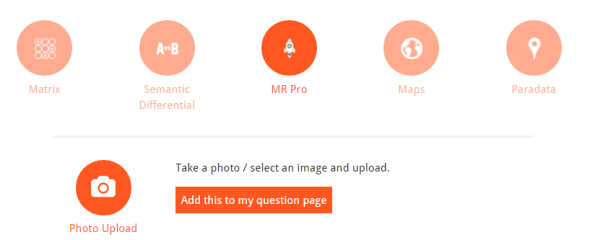
The feature is available in questfox under MR Pro
(requires questfox Professional Edition):
 questfox News