questlogix updates online
Posted: 12. June 2014 Filed under: Uncategorized Leave a comment questfox received a brush-up in the questlogix section.
Not only the design is improved, but the function for panel interactions are now integrated in questlogix.
The setting of conditions allows to define even the most complex conditions.
Several action procedures are now available. After a condition is fulfilled questfox allows you to distinguish:
- Activation Procedures (Activation an Deactivation; Jump and Re-Direct)
- Live Calculations (Calculate on the fly during the interview=
- Live Reporting (Send Reports even while the interview is still in progress)
A new screen out feature can also mark interviews with the flag “quality issues”
Remember that questfox is fulfilling highest market research industry standards for the setting of very complex logics.

We often figure out, that the software is able to do all this easily, but the person defining the rules sometimes gets lost in complex projects.
Constant SUM in questfox with Live Check of SUM
Posted: 4. June 2014 Filed under: Uncategorized | Tags: Constant SUM; questfox Leave a commentEven though we are not huge fans of the methodology of a constant sum, we were pretty much forced into its questfox integration.
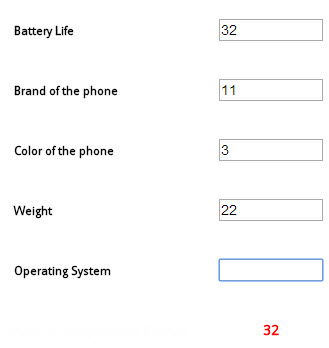
The constant sum question is checking a list of items for a sum which can be set at a defined value or range. questfox now automatically checks, whether the defined sum is reached.
Example: How do you evaluate the following features of a smartphone?
Please give points to each item which must sum up to 100 points
You will find this new question type under NUMBER

The first version is already integrated into questfox
Number typed in textbox incl. constant sum check
Please allow us to develop the awesome version of a graphical data input of the contant sum inside of questfox (perhaps we will become friends again with the very unliked constant sum)
Number selected with slider incl. constant sum check
“Next” step in automation in questfox
Posted: 4. June 2014 Filed under: Uncategorized Leave a commentquestfox now has two simple but kind of powerful tweeks available.
1. The delayed “Next” Button can be shown with a timed delay on each question page.
This feature is to be used when you want to make sure, that people do not just click through your questionnaire without reading the information.
You can give your respondents a certain amount of time to think about before they can advance by clicking “Next”.
The example shows a setting where the NEXT Button only appears after 8 seconds of screentime of the question.

2. The auto-submit “Next” Button can be automatically set after a defined time in seconds.
This feature can be used to set pressure on the respondents on each page.
You might want to integrate an animated GIF Button counting down from ten in steps of a second to support the understanding of this feature. It could also be used to create a self running demo of your questionnaire.
The example shows a setting where the auto-submit NEXT is launched by questfox after 5 seconds of screentime of the question.

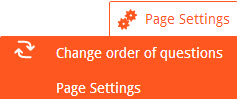
Both settings are defined in the page settings of each question page. The default is 0 (which is also used to switch the function off again)
Continents drift apart in questfox
Posted: 23. May 2014 Filed under: Uncategorized | Tags: Continental drift; questfox; pangea labs, World map Leave a commentThe new continent selector is online inside of questfox.com.
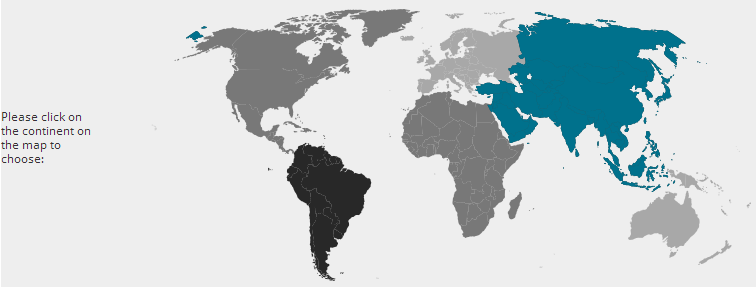
Even though we strongly believe in the pangea concept of continents very close together, we are sometimes forced to show a world from above, where people tend to be dfar away from each other.
The world map with the continents to select from is now availaible in questfox under CREATE – MAPS
Berlin map with 96 districts integrated in questfox
Posted: 21. May 2014 Filed under: Uncategorized Leave a comment
questfox is offering a detailed map of the City of Berlin. In this map the focus is geographical and not political at all.
One can select out of 96 regional spots inside the city/state of Berlin.

This feature is available for questfox users under MAPS

Renaming Response Groups into Report Groups: questfox reporting features aboute to be updated
Posted: 13. May 2014 Filed under: Uncategorized | Tags: Report Group; questfox reporting; market research; qfx Leave a commentWe are about to develop a set of new and thrilling reporting features for questfox.
While doing usability testing, some of our testers were constantly worried about the wording of the questfox “response group”.
The powerful feature does make a lot of sense, just the wording seems to be misleading. This is why we renamed it into the clearer description of a “Report Group”.
The Report Group sets togehter a defined filter (even complex filters) and allows the questfox user to see the report of a defined group of respondents based on the criteria set in the Report Group definition. You will find the functionality under “Define Report Groups” in the REPORT section of questfox.

Sending individualized PDF reports with questfox to each respondent right after the interview
Posted: 12. May 2014 Filed under: Uncategorized | Tags: Individual PDF Report in market research, survey research Leave a commentThe questfox functionality of sending out individualized PDF reports has undergone a facelift and especially a technically improvement. As user reports were becoming longer and longer, showing more and more graphical content, respondents did not want to wait until a server could assemble such a document live. This is why the creation of a PDF report has become a background process managed by the questfox server farm.
How do you send out individualized PDF reports right after an interview?
1. You ask for a respondent’s email address in the survey (CREATE a email input type question)
2, You define the sending of a report to this address (remember to use your individual server settings to send out emails like this. Use the ID of the email adress question as the target variable for the address (ID e.g. 1c7e52f9-7b6f-432c-a015-421701fa932e).
3. Attach a PDF in front and after the individualized report in order to make the PDF more appealing
4. Optional: You can prevent results from being shown in this report by deactivating “Show this page in respondent’s report” in the page settings of each question page 
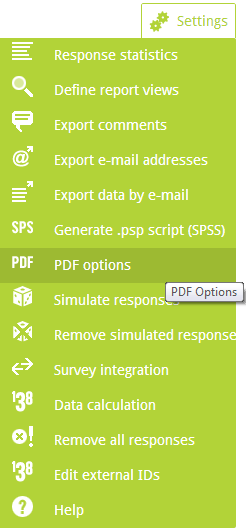
All these settings can be defined under “REPORT- PDF Options”
At the moment your contacts will receive an email sent from info@questfox.com. In later versions your own email settings can be applied here too.
Speeders stopped in questfox – clients can save money while improving sample quality
Posted: 7. April 2014 Filed under: Uncategorized | Tags: Speeding of respondents; questfox Leave a commentSpeeding of respondents prevented by questfox
Some respondents tend to speed through a questionnaire for different reasons. There are people who even seem to be able to read entire pages in a second or less.
questfox now offers the opportunity to stop respondents from speeding through a questionnaire. In page settings for each page you can set a limit which should not fall below a defined minimum time. Example: If you defined a speed limit in a page (in seconds) the overall time used until that point is taken into consideration. If a respondent reached page ten already after 55 seconds, the person might be considered to be speeding and will be screened out by questfox (Example if setting in q10 is set to 55). Attention: The overall answer time upto that point is calculated.
You can also set severall speeding control points in a project. Carefully integrate that function into your projects and you will save money and grow the quality of your sample.
“None of the above”: new settings for exclusive items in questfox
Posted: 23. March 2014 Filed under: Uncategorized Leave a commentA list of multiple answers often has this one item saying “None of the above”.
You can now switch a single item of a checkboxlist to “exclusive” which makes all other answers of this list disappear with one click on “answer is exclusive in checkboxlist” in the settings of this specific item.

Example of a list of answers (some of them checked):
The moment the surveytaker clicks on “None of the above” all other answers vanish:

New editor in Metro Design in questfox
Posted: 20. March 2014 Filed under: Uncategorized Leave a commentA new editor was integrated into questox.
The fresh design in Metro Style is bringing things down to the minimum necessary.
The editor is invisible until the moment you click into the text box.
Taking back all the information will help you concentrate on your quest.
From know on this editor is available in all text boxes with this feature.
Example of the new editor window (only visible after clicking into textbox)

 questfox News