Today questfox server update
Posted: 31. December 2011 Filed under: Technology | Tags: Update Leave a commentToday the questfox server update will take place from 11:00 c.e.t.
The DNS routing of the address should be finished during the 1st of January 2012.
Please make sure that no interviews will take place during this time.
Thank you for your understanding.
You will take advantage of the new more powerful environment with the start of 2012.
All the best for a successful new year.
Major questfox server update – questfox down during new year’s eve
Posted: 29. December 2011 Filed under: Uncategorized | Tags: Server update Leave a commentWe are testing a brand new server platform for questfox with major improvements in accessibility and speed. The platform is already installed and we are testing all the features of questfox at the moment.
In the next 48 hours we will be ready to also switch the questfox database to the new environment. This means: No interviews should be run while we switch to the new environment.
We will announce a precise questfox downtime soon. The plan is to run the switch to the new server platform in the night from the 31st of December 2011. We would ask you not to invite respondents on the 31st anymore, because those interviews will then run into an old database.
We wish you all the best for the new year which will start with a brand new server environment of questfox and more functions.
HTML Trouble with new Decision Tree Stage with Firefox
Posted: 18. December 2011 Filed under: Uncategorized | Tags: Problem Leave a commentWe are really proud of our update with the new decision tree stage, but some users were facing some browser issues which turn out to become a graphical problem.
The moment you touch one of the new data fields (even without putting content into it), FireFox implements the < br > sign into the field which means creating a new page without content. This page than shows up as an empty page with a number which is disturbing.
While we are looking for a solution of the problem we would recommend to you not to click into those fields that you do not want to use.
If you want to get rid of entries, we suggest the following work-around:
1. log in in with Google Chrome, Internet Explorer or Safari (but not FireFox)
2. enter the item and click on HTML view,
3. delete the < br > content
4. and press save.
This is just a second best solution but might help you setting up your projects.
We keep you informed when the problem is solved.
New Decision Tree Stage
Posted: 5. December 2011 Filed under: Technology | Tags: AHP Leave a commentA relaunch of the decision tree stage was installed yesterday.
The decision tree question type now allows you to use three small pages with additional information within one element.
Give it a try and inform us about your experience.
More graphical features will be implemented once everything has been tested.
Send preview link by e-mail
Posted: 30. November 2011 Filed under: Uncategorized Leave a commentIn Invite you will now find a new link which opens your e-mail program and implements a link to a mail.
Using this function you can allow people to add comments during a pre-test. The texts are saved below every question.
This simple function is meant to ease the process of creation.
New ways to publish on Facebook
Posted: 9. October 2011 Filed under: Technology | Tags: Facebook Leave a commentDue to some technical changes initiated by Facebook, the publication of questfox links on Facebook has undergone some changes. The major change is the necessity to use secure connections.
This is how you use the new connection to facebook with questfox:
In the section invite you will find the opportunities to publish your link to facebook und “Redirect Links”.


Once you installed a specific redirect link, you will find it in the list of re-directs.
The facebook link is to be found behind the logo  .
.
Right click the logo to get access to the facebook link directly. This link can be posted everywhere and will directly open your questionnaire in the facebook frame.
The new facebook links looks like this:
https://apps.facebook.com/questfox/qf/YOUR_CLIENT_AREA/YOUR_REDIRECT
All the necessary settings for the facebook use are already integrated in the background of the link. If you used several aditional linktails they are also integrated automatically in the facebook re-direct.
Have fun with this new way of publishing questfox studies right on facebook.
Cascading Style Sheets (CSS) on Project Level
Posted: 30. September 2011 Filed under: Project Management, Technology | Tags: CSS; Cascading Style Sheet Leave a commentCSS – Cascading style sheets are now implemented into questfox.
The rules are cascading too.
It is wise to define the style on the project level an NOT manually changing entries on a page.
A general non-specific questfox style sheet is applied if you do not change anything at all.
You can then define your client areas style sheet which will affect the formatting of all projects of your client area.
Inside each project you can define specific formatting styles just for this project.

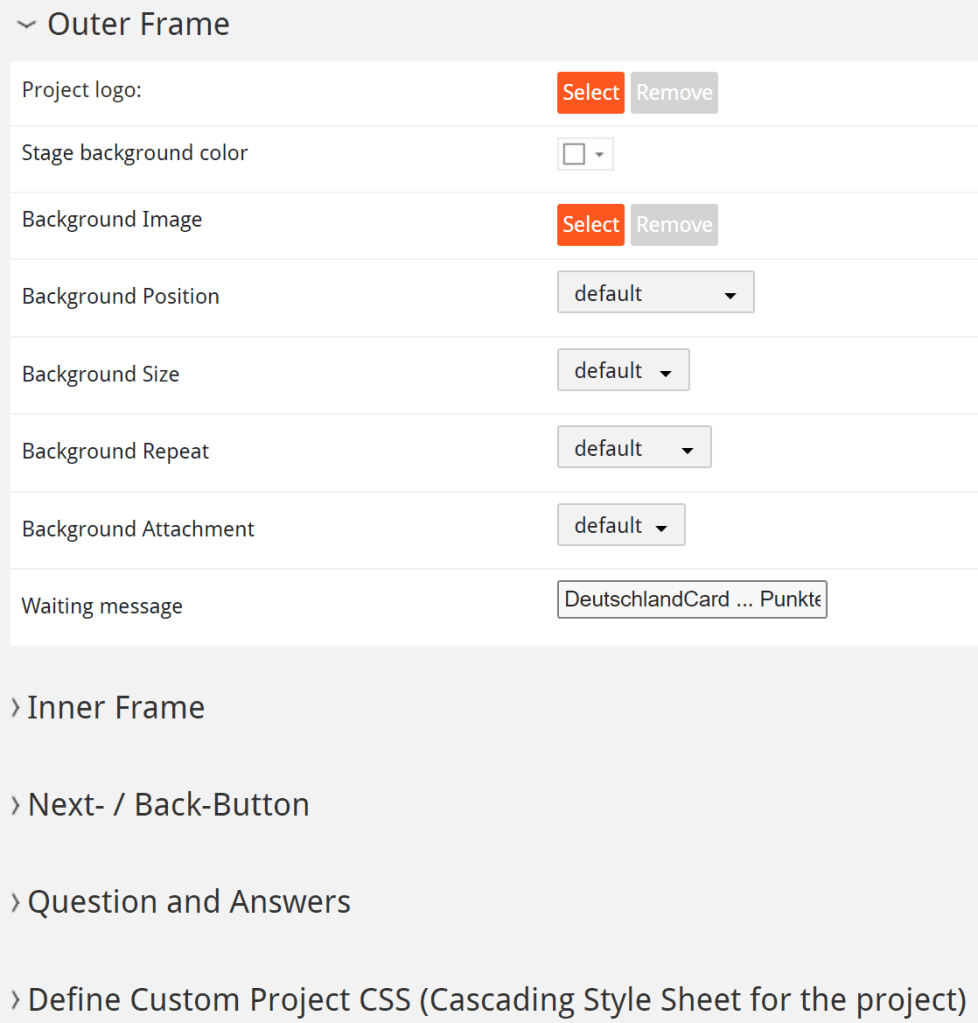
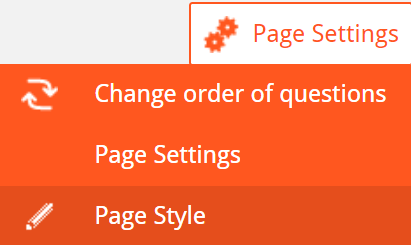
Cascading means, that the design is rolling down into your project from above. If you define something specific on one page this is breaking the CSS rules.
On every level you can code the CSS right away into questfox

answerCtrl.answer.title
body {
font-size: 1.2em;
font-weight: bold;
font-family: ‘Open Sans’, sans-serif;
}
.answerItemLabel {
color: black;
font-weight: bold;
font-size: 1.2em;
}
.matrixbutton{ padding:10px!important; }
body {
background-repeat: space;
background-size: cover;
font-weight: bold;
}
.qa_question_text_left{
font-size: 0.9em;
color:#293038;
font-weight: bold;
}
.qa_question_text_right{
font-size: 0.9em;
color:#293038;
font-weight: bold;
}
.answerTitle {
margin-top: 1.6em;
font-size: 1.2em;
font-weight: bold;
}
.btnNext button {
font-size: 1.5em;
letter-spacing: 1px;
text-align: center;
text-decoration: none;
text-transform: uppercase;
}
.questionText > span > p{
font-size: 1.4em;
font-weight: 600;
}
.questionText > span > p{
font-size: 1.4em;
font-weight: 600;
}
/* Setting Color of MARKED item */
.singlechoice.active::after, .matrixbutton.active::after, .pic.active::after {
border-right-color: #380E31;
border-top-color: #380E31;
}
body {
background-color: #ffffff;
}
.textarea{
font-size:1.3em
background-color: #dddddd;
}
Finally it is still possible to define single elements by using an HTML code directly in the specific element.
Wishing you more stylish projects with questfox in the near future.
Project Management Improvement in Preview
Posted: 29. September 2011 Filed under: Project Management | Tags: Preview Leave a commentWhen using the preview function you will experience a text box underneath the question page. In order to control the live questionnaire, you can type in your comments which will be saved inside the question page.
While working inside the questionnaire you will find all the comments of all the previews (Even from different people)
In the project overview you will also see the comments added to your questions.
An extra Link to make your preview accessible to people without a questfox login will follow after some testing of this new feature.
Response Management – Additional folder structure for “unreachable” respondents
Posted: 28. September 2011 Filed under: Technology Leave a commentWhen inviting thousands of people you realize that some of them are hard to get even after inviting and reminding them. If you plan to continue inviting these “hard to get” respondents may be in your way while inviting others.
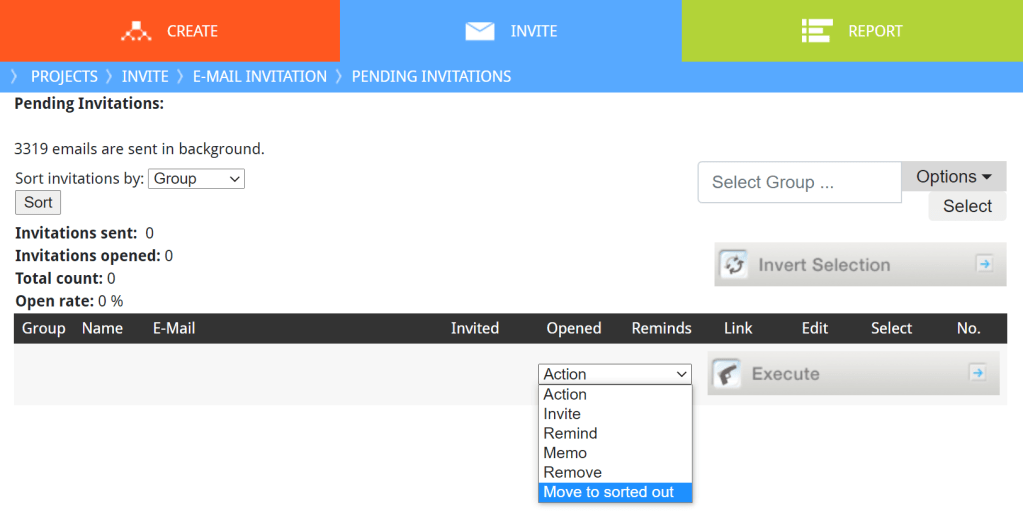
This is why we defined a new group of respondents like the ones described. You can literally sort them out from the invitation list and put them into a special structure folder. It is possible to organize the people you could not reach with an email in a special folder called “Group of unreachables”

To do so you select the candidates that you would like to move and click onto the Action “Move to sorted out” and then press Execute.
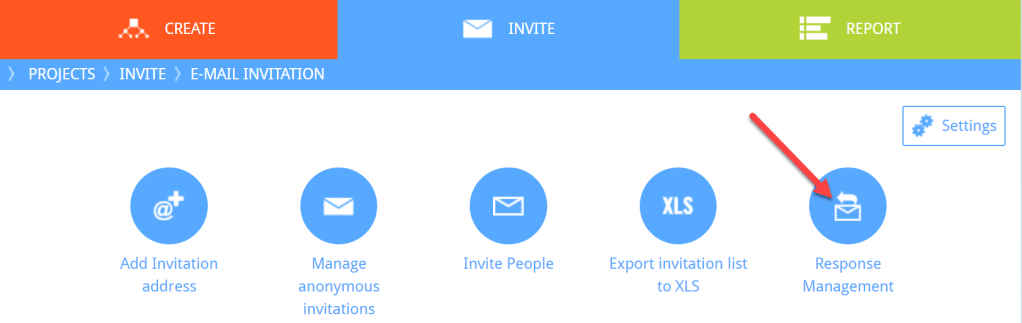
Later you will be able to find those people under “Response Management” and then “Pool of unreachables”
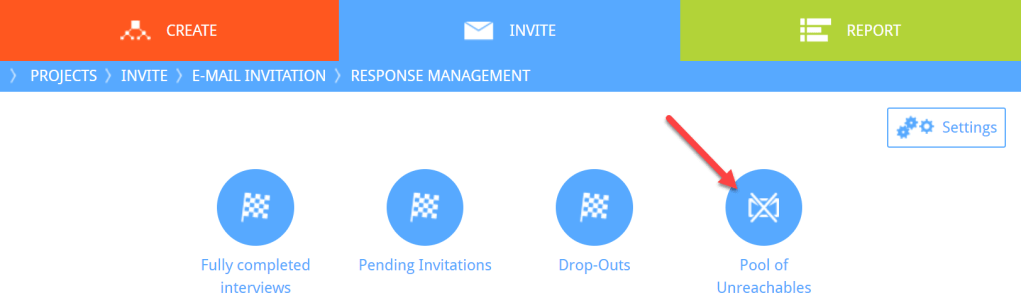
Potential Respondents who might still want to take the survey after they have been moved into this classification are still allowed to participate. The created links remain active until a person is delete from the list.
HTTPS – Secure Access to questfox
Posted: 28. September 2011 Filed under: Technology Leave a commentThe digital certificate to access questfox was renewed.
By using this link https://questfox.com/admin you will use a secure connection when working with questfox.
The secure connections could also be used when interaction with your respondents.
 questfox News