questfox feature alert: PDF Upload as question type available in questfox
Posted: 30. March 2017 Filed under: Uncategorized Leave a commentquestfox is used by more and more people in more and more scenarios. One of the requirements of our clients was the opportunity to upload PDF documents during the survey process.
You can now implement the question type PDF upload and ask your respondents to upload a PDF. At the moment we allow a maximum of 10 MB for each upload. Surely there is no reporting on uploaded PDFs possible, but you can download the documents from each respondents case.
pangea labs screen backgrounds
Posted: 19. November 2016 Filed under: Uncategorized Leave a commentMore and more questfox users apply specific screen backgrounds for their surveys. We support this with some basic background templates.








#questfox feature update: Browser #Fingerprinting to prevent multiple participation from one participant
Posted: 17. November 2016 Filed under: Uncategorized 1 CommentIn times when people receive money in exchange for market research, the willigness to participate several times in a survey tends to be higher.
questfox now offers you a protection from multiple participation by using a browser fingerprinting technology. This option is meant to protect a project from unwanted multiple responses from one browser.
In questfox you can find the option under Project Settings.

Switch it on to protect your project from multiple responses from the same browser. Be aware that even the preview mode will not work anymore after you finished the survey yourself. The blocking of a survey will only be used after a survey was fully completed from that browser.
If a respondent opens the link with a different browser the fingerprinting mechanism would only work after the completion of this survey. To avoid those cases it would be helpful to hide the URL-Paramters in the browser (also under Project Settings).

Overall this feature is helpful to prevent spontaneous multiple participations. If user seriously want to cheat with you, this is only a weak protection. Anyhow we are happy to offer that feature to our users.
questfox is only storing that information for the sheer purpose of blocking people out who already took one specific survey. We are not using or sharing this information at any point during an interview or later.
If you want to find out more about Browser Fingerprinting here is a source where you can find out, how unique your visit to the internet is. https://amiunique.org/fp
Hiding the intro page in #questfox
Posted: 20. October 2016 Filed under: Uncategorized Leave a commentA little reminder of a nicely hidden, but sometimes useful feature. Adding &skipIntro=1 to any questfox link would leave out the first introduction page and make you jump right away into a question. While adding more information to the link you can also steer the respondent into a specific part of your survey.
&skipIntro=1 is all you have to attach to the link. You can still use the questfox link shortener and hide this info from people before sending out that link.
questfox mobile research app updated
Posted: 14. October 2016 Filed under: Uncategorized Leave a commentWe are working on some updates of the questfox features. You can see some new examples of mobile in-app research
You can find the questfox mobile research app updated in the Google Playstore under
https://play.google.com/store/apps/details?id=com.phonegap.questfox&hl=de
#questfox feature alert: Auto-Next for Analytic Hierarchy Process in #questfox
Posted: 21. September 2016 Filed under: Uncategorized Leave a comment
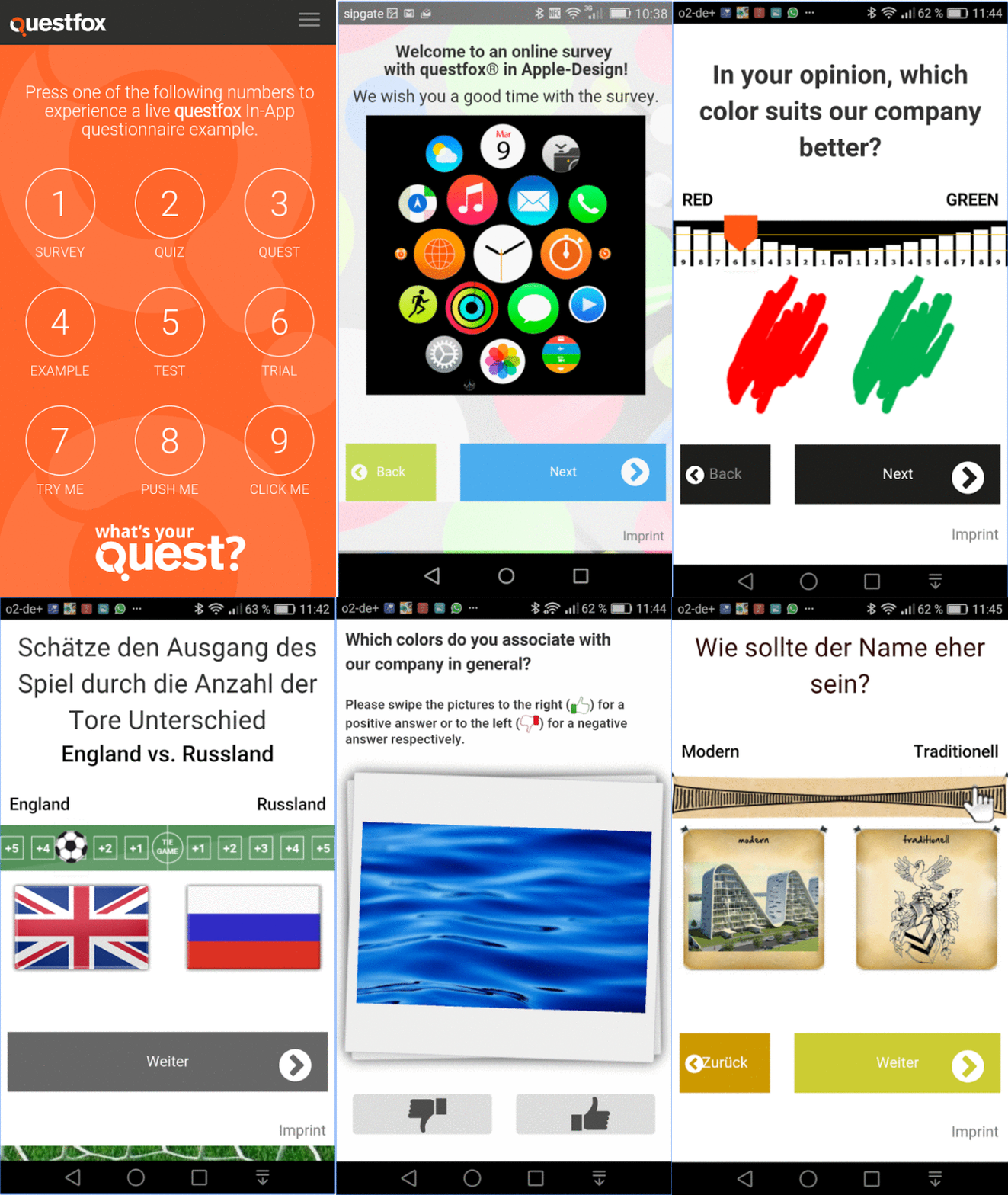
After years of research and even a PhD about the idea of shorting complex Analytic Hierarchy Process questionnaires, we finally came up with a pretty simple and straight forward idea which is now implemented inside of questfox.
The NEXT Button does not need to be clicked anymore. A respondent may either click or swipe and let go the slider. We are still testing the effects on respondent’s behaviour and can already advise you to allow a BACK Button too.
Here is an example of someone going quickly through an AHP questionnaire powered by questfox:

If you want to play it live, here is a link for your test drive with questfox
Looking forward to see your projects speeding up in time (and quality).
questlogix re-direct dynamic data transfer into third party system with #questfox
Posted: 1. September 2016 Filed under: Technology, Uncategorized | Tags: Linktail, Re-Direct 2 CommentsAfter an interview is finished some projects require to transfer information into a third party system. A panel wants to know who did finish the interview. A CRM manager would like to see the NPS Score in his own system. questfox allows all of this with some interesting features of adding information to a re-direct link.
questlogix allows you to re-direct a person while transferring questfox data into another questfox project or into any other website that allows to receive data.
Open questlogix under Create Settings

Define a condition when this re-direct should occur. It can basically take place at any moment. The standard would probably be “at the end of the survey”
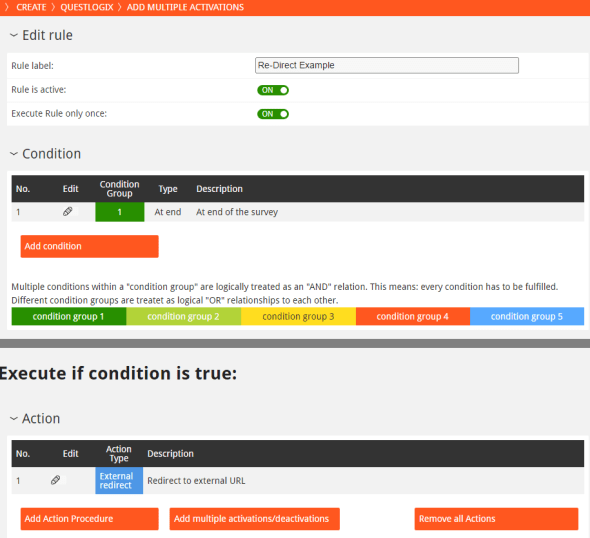
Define the Action Procedure as “Redirect to external URL“. Type in your URL and the respective linktails.
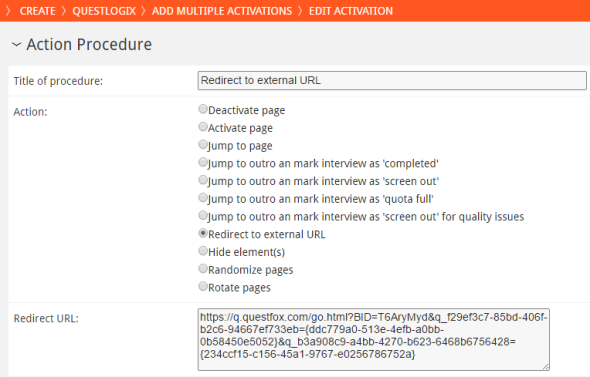
The example opens another questfox project and transfers two (first one is red, second is blue) into that new project. The link would look similar to this one:
https://q.questfox.com/go.html?BID=T6AryMyd&q_f29ef3c7-85bd-406f-b2c6-94667ef733eb={ddc779a0-513e-4efb-a0bb-0b58450e5052}&q_b3a908c9-a4bb-4270-b623-6468b6756428={234ccf15-c156-45a1-9767-e0256786752a}
Using this function you can also send one or several pieces of information into any kind of CRM System (e.g. Client ID plus Net Promoter Score). You only need to know the IDs of the receiving website.
In relation to the topic please also consider the posts about
Using variables inside a questionnaire like in serial letters #questfox
Magical Re-Direct Linktails in #questfox
Magical Re-Direct Linktails in #questfox
Posted: 1. September 2016 Filed under: Uncategorized 2 Commentsquestfox SaaS offers all functionalities to transfer data into questfox or to re-direct a person to a thid-party website with additional information to be used by the website owner. to interact with other websites

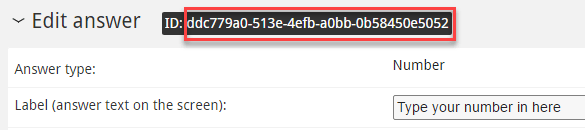
Add this ID to your link with a value behind.
Adding hidden information to your questfox project from the outside

Under INVITE you can add numerous unique links to questfox. The unique links can have additional so called linktails carrying additional information.
Just add &q_ and your question ID with the number that you are transfering (here: 666)
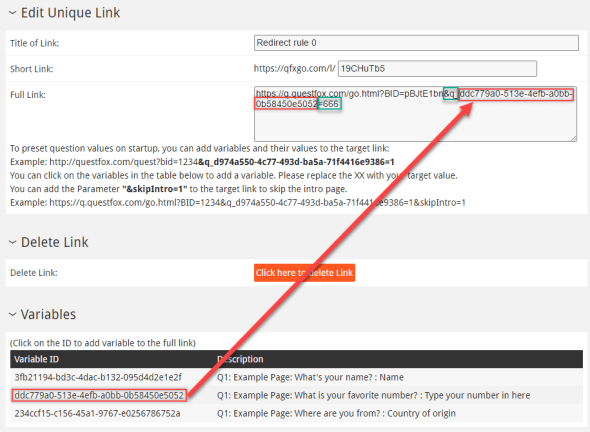
This number will be saved in the variable.
You can use this function to transfer customer IDs into questfox or to differentiate different website sources by giving each partner site a specific link which fills the question with a specific value.
Also see:
Using variables inside a questionnaire like in serial letters #questfox
questlogix re-direct dynamic data transfer into third party system with #questfox
Using variables inside a questionnaire like in serial letters #questfox
Posted: 1. September 2016 Filed under: Uncategorized 2 CommentsA simple example:
A single choice question is designed as follows:
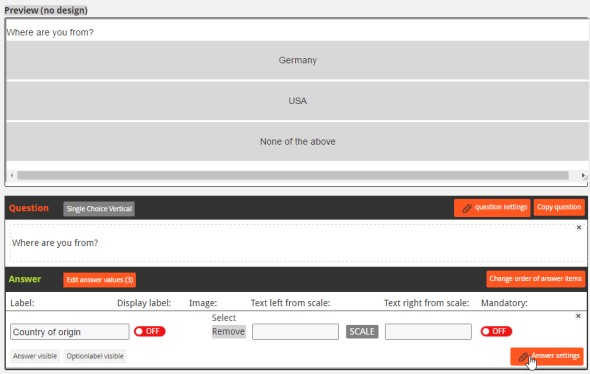
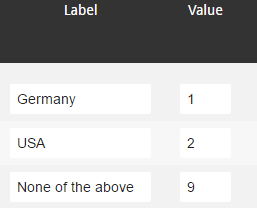
Label vs. Value
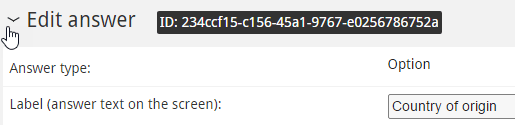
Finding the questfox ID of a question
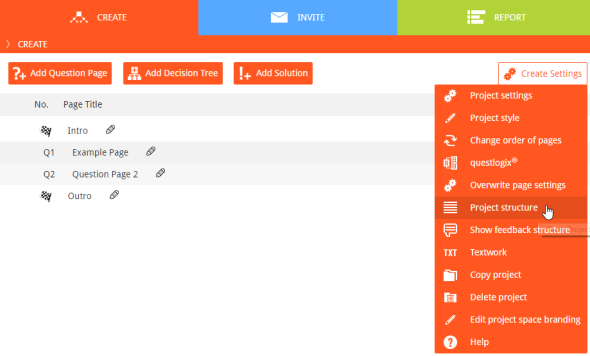
If you want to use a questfox variable inside of questfox you need to find the questfox variable ID, which always looks complicated like 3fb21194-bd3c-4dac-b132-095d4d2e1e2f
Under Answer settings you can see the ID of that specific question
A list of all your variables and their respective IDs can be found under “Project Structure” and Show List of Variables.

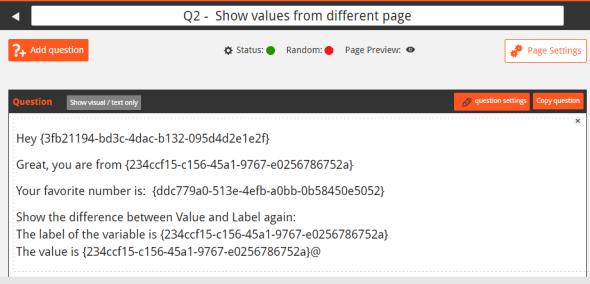
Adding IDs into the question part
- The label of the variable is {234ccf15-c156-45a1-9767-e0256786752a}
- The value is {234ccf15-c156-45a1-9767-e0256786752a}@
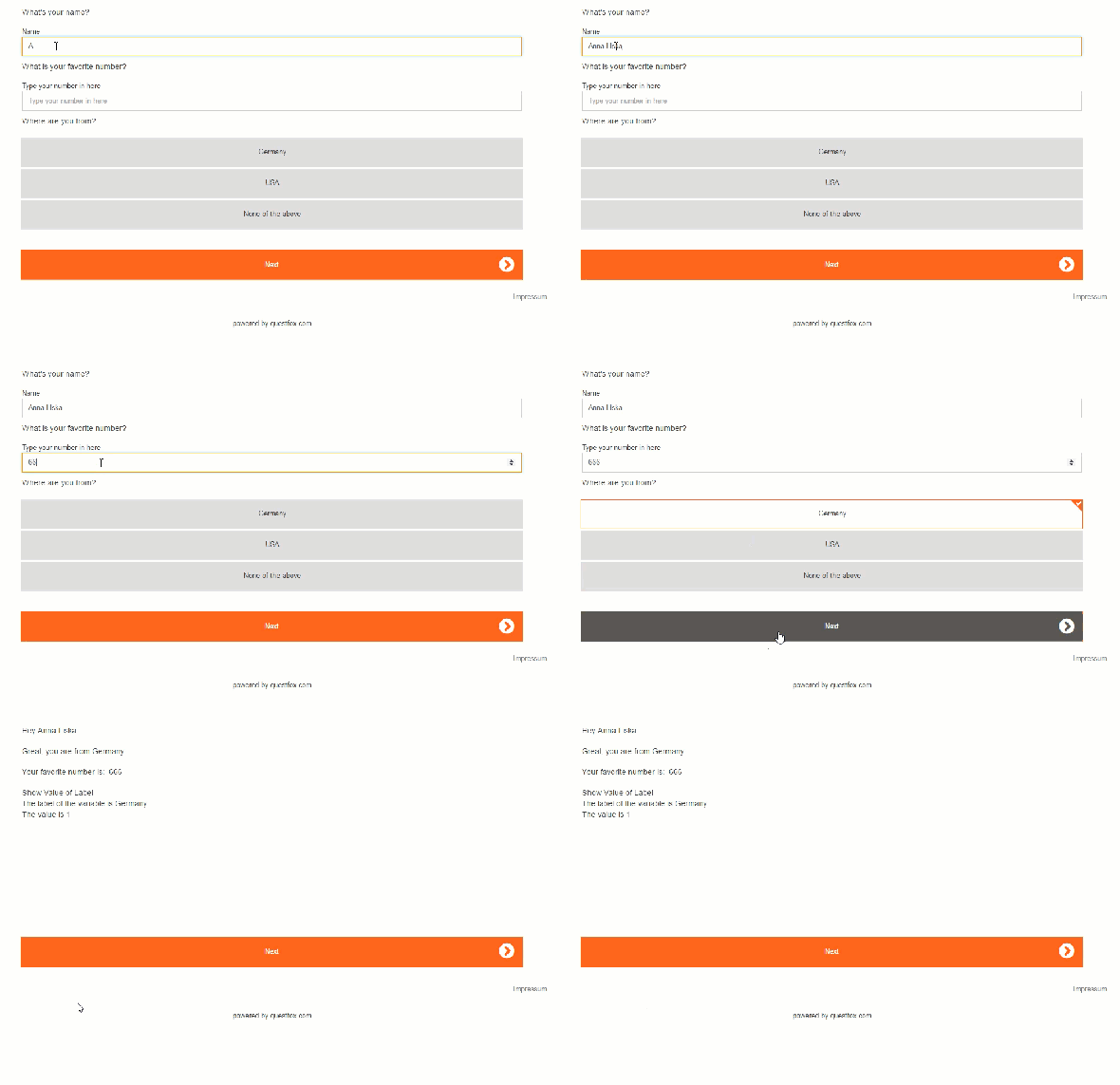
Just put in those IDs into any kind of questfox question right into the question text.

Import external data into #questfox survey data
Posted: 10. August 2016 Filed under: Uncategorized 1 Comment
We happily announce the possibiliy to merge external data with response data from interviews inside of questfox. The function can be used to integrate customer data or non-responsive tracking data in combination with the incredible questfox living report features.
The function “Import Data” in the section REPORT allows you to assign additional data to your existing questionnaire data.
There are only two pre-requisite to merge a data file into questfox:
- A variable with the defined name of the input field has to be created inside of questfox. The ID of this variable becomes the name of the first row in your upload data.
- An identical key to merge the upload file is used in both data sets (questionnaire and import file)
How to use the data import function:
- Prepare the required empty questions in your questfox project of the kind of data you would like to import (text, number, single choice etc.). It is a good idea to use the first page of your project for this purpose. Make sure that the questions are hidden from the interview process.
- Prepare the upload data to communicate with questfox. Prepare a CSV file (comma seperated values), in which the first column contains the merging key data. The first row of your CSV file must contain the question ID of the prepared empty questfox placeholder (ID looks like this 6c50a15c-86ac-49b9-b7de-674a9a6a45bb; the list of IDs of your project can be found under CREATE – Settings – Project Structure – Show all Variables).
Your data structure should look like this prior to upload.
- Under REPORT – Report Settings click on Import Data
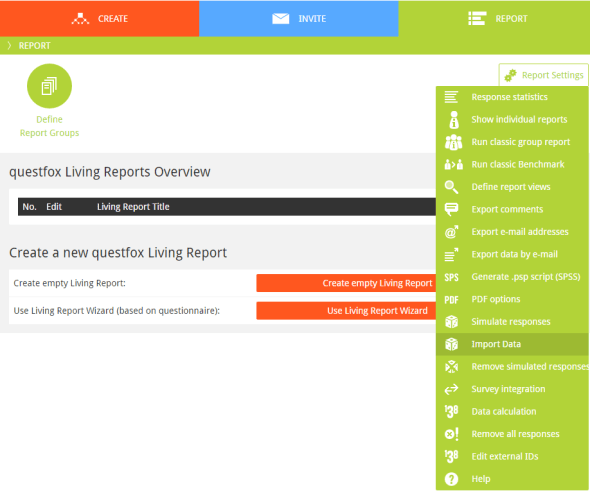
4. Select the file and press “Start Import”
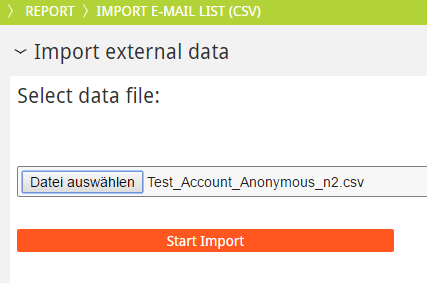
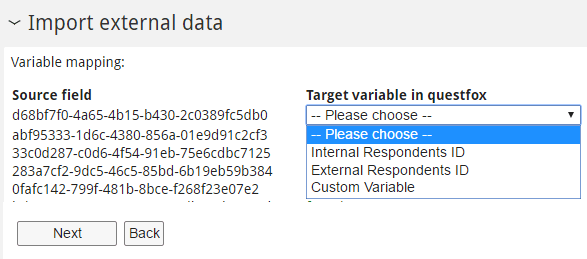
5. Select the Target variable in questfox to be matched with the external key (first row of your data set).
The key can be matched with an Internal Respondents ID, an External Respondents ID or a Custom variable of your questfox questionnaire.
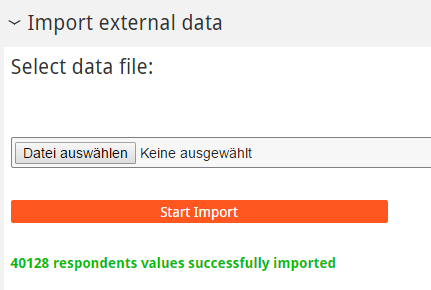
After clicking next the data is integrated. Depending on the filesize it may take even minutes before your entire data set is integrated. A success message will apear after a successful import.
The new functions will help you to generate more detailed insights of your questionnaire projects. Looking forward to see you progress with questfox. Make sure not to break any data security rules when using the import funtions.
 questfox News