Handling of internal and external IDs for re-direct links
Posted: 18. November 2020 Filed under: Uncategorized | Tags: External ID, External Response ID, Internal ID, Internal response ID, Panelconnector, Re-Direct Leave a commentThe questfox system is a little picky in terms of letting other tools know about internal IDs. But here is the description of a work around if you need to use the internal or the external ID.
Internal response ID
Internal questfox ID: The internal ID is a unique ID that is generated for every participant.
It looks similar to this:
ff211178-8f79-40ec-8ffa-bce6914ec5fa
If you export the data you will find that internal ID in the first row of the data set.
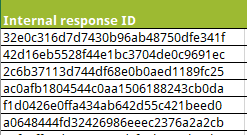
Now here is the trick how to use that ID inside your questionnaire and for re-direct links.
- Create a new TEXT question
- Hide this new TEXT question from being shown in the questionnaire
- Create a questlogix with calculation

- Trigger: At the beginning of the survey
Calculation (pick the target variable, in which you want to overwrite the internal ID.

- Just type into Calculation Formula:
qf_RespondentsID
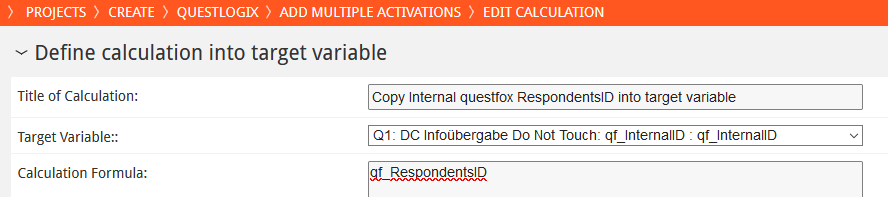
This procedure will right at the start of the survey write the internal ID into that new variable that is accessible to you. You now have access to that field as if it was a regular question. For example you can transfer this value into a panel tool by adding the new variable code to a link.
The code can be found on top of each variable.
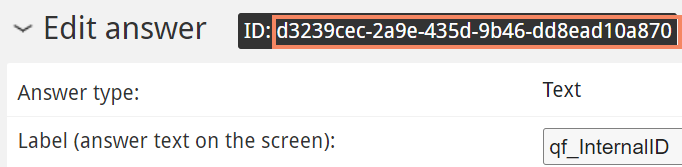
Add your variable to the link in brackets like {yourVAR}
Panel.TLD/questXYZ&InternalID={d3239cec-2a9e-435d-9b46-dd8ead10a870}
External Response ID
External IDs are pretty common in the interaction with people. You may find them as Panel ID; Customer ID; Student ID etc. In normal studies startet from questfox you may not even use an external ID. It is possible to upload addresses into questfox using this external ID. In case you are in interaction with an inviting panel company they will definitively send an ID over to questfox to be treated as an external ID. Normally this value does not leave the survey system. But sometimes you may want to re-direct into other tools and back and may need that ID.
The procedures is identical to the one described above for internal IDs. The only thing you need to remember is that the internal description of any kind of external ID in questfox is called:
qf_ExternalID
Again you may want to create a hidden TEXT Variable and overwrite its value at the start of the survey with qf_ExternalID.
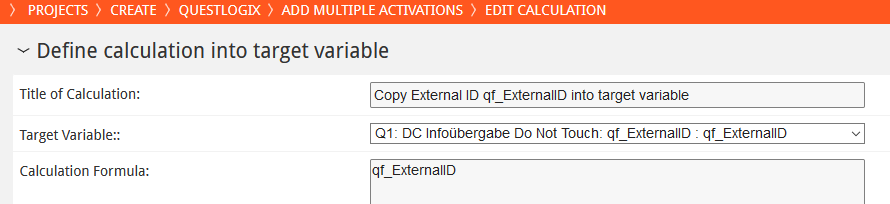
And after that procedure you can use that ID as often as you want.
| Variable | Name of the variable | |
| Internal ID for each questionnaire | qf_RespondentsID | |
| External ID (only in connection with other partner) | qf_ExternalID |
Device Agnostic Implicit Measurement with #questfox #system1 # implicit #seriousfun
Posted: 1. November 2020 Filed under: Uncategorized Leave a commentHappy to announce a break-through in the development of a brand-new question type inspired by the ideas of Daniel Kahnemann and Amos Tversky.
The question type Implisort is meant to cover the system 1 environment of fast and instinctive decision making.
We are very proud to be the developer of the first worldwide implicit measurement tool that works on all kinds of devices without necessary technical adaption. The question type is functional with multiple interaction tools like mouse, defined keyboard keys or even touch screens. This also includes mobile smartphones.
The continous development of our TinSort idea is now measuring the time a respondent needs to answer to a specific stimulous. Series of simuli can be exposed in random sequencens to be answered and measured in reaction time.
The new question type ImpliSort is avaiable exlusively in questfox. It can be combined with any other question type and therefore be analyzed in totally different szenarios.
The flexibility of questfox allows to transfer data and even react on data given by the respondents (Ex. Someone slower than average is re-directed to other questions).
We are entering a new field of research allowing questfox users to develop their own approaches of implicit measurement. We are just the technical provider of an idea which will grow with the usage of more savvy people in the world of psychology. Looking forward to see your ideas grow with our tool.
We have to admit that we are still running a series of questions testing the effects of different interactions modes and their results in numbers. We will be able to deliver a lot of new ideas based on that initial idea of analyzing decision making in system 1.
By the way: We still offer a complex world of system 2 questions in the Analytic Hierarchy Process environment. With our recent developments both worlds can be better understood in the future. A combination of this idea with other questionnaire approaches helps to develop new research ideas.
WaveNet Text-to-Speech integrated into questfox
Posted: 1. November 2020 Filed under: Uncategorized Leave a commentReading out loud the research question
For years we have been using different tools to create synthesized speech from text. In 2017 these features were implemented in questfox in times when it was even a little too early for that technology. Our speakers sounded a little too artificial to the human hear.
With the last update we are now able to deliver more human sound in the reading out loud functions of questfox by integrating WaveNet right into questfox.
WaveNet
This is what Google tells about the WaveNet Development.
“Google Cloud Text-to-Speech enables developers to synthesize natural-sounding speech with 100+ voices, available in multiple languages and variants. It applies DeepMind’s groundbreaking research in WaveNet and Google’s powerful neural networks to deliver the highest fidelity possible. As an easy-to-use API, you can create lifelike interactions with your users, across many applications and devices.”
Source: https://cloud.google.com/text-to-speech/
TTS in questfox Multimedia Insights
You will find the function right under Multimedia Insights – Text to Speech


At the moment we offer 5 languages for the text-to-speech functionalities inside of questfox. The default language is English (US).
5 languages already available in questfox

WaveNet was first supporting English and only integrated German lately. It may take some time before other languages may be available. We will keep you updated on the issue.
Select the voice of your choice

Listening while reading?!?
We are still in consideration whether participants should listen and read at the same time. Some of our own people argue that we should force interviewees to listen only. If you plan to do this you can set the visibility of the text to hidden by integrating the following into CSS.
Click on View – Source Code to open the HTML Window of the editor.
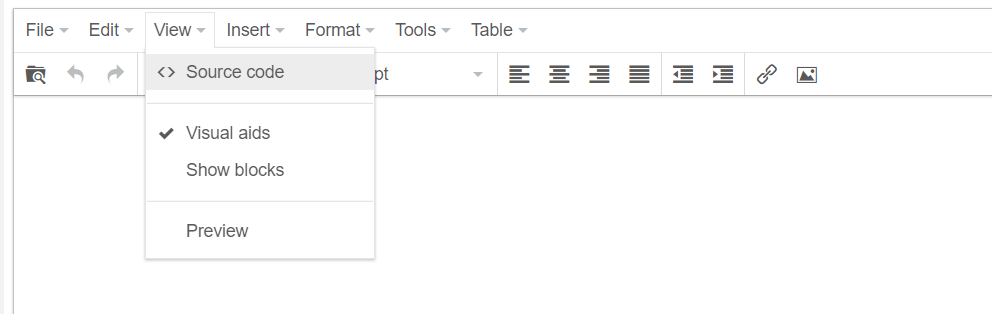
Put the following command in front of your text
<p style=”visibility: hidden;”>Your text here</p>
And you will no longer see the written words.
Please only do so once your text is finalized because you will not even see the text anymore in the editor 🙂
Future of speaking software
Looking at the speed of development we are pretty confident, that these functions will become better and better. It’s not bad already. But are you and your respondents already ready for this?
An interesting project in South Africa showed us the potential of this approach with people who are listening to the read out loud questionnaire.
How to motivate survey participants from the start?
Posted: 22. July 2020 Filed under: Uncategorized Leave a commentEvery questionnaire is too long
It is a sad truth that every questionnaire is too long. But the reason why respondents drop-out are more related to the first minute of interaction than to the actual duration of your questionnaire. On average more than 50% of the people clicking on your survey link drop out on the INTRO Page. They run away as you are trying to say hello. So please take some extra care when designing this page.
INTRO Page is the most important page in a survey.
The INTRO-Page is by definition the most important page of your questionnaire. Here people are coming in after an e-mail invitation or a link on social media not exactly knowing what to expect from the survey (sometimes even not knowing that it happens to be a survey).
So please make sure, that these first seconds of the contact with an unknown third party are a pleasant experience. Try to integrate some interesting things and try to avoid boring necessities like legal texts (if your institution does allow you to link=hide that somewhere else)
Killers of Motivation
- Standard text is not a motivator
- The detailed descriptions of your problem is not helping others
- Your internal issues are not motivating
- Legal hints are not motivating
- The need to scroll is a killer on a desktop and even worse on a smartphone resulting in drop-out rates. If one can’t see the start button chances are high to lose that person even before the start.
- Big pictures need to be downloaded by the participants and will create drop-outs when they come in slow over slow internet connections.
Suggestions for motivating INTRO pages
- try to be interesting
- Move things
- Do not use too much content in this phase
- FOMO: Create the fear of missing out
Example of the questbox Intro

How to create a motivating INTRO Page in questfox?
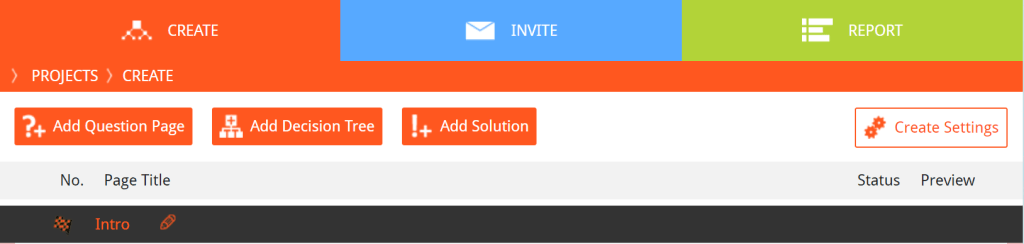
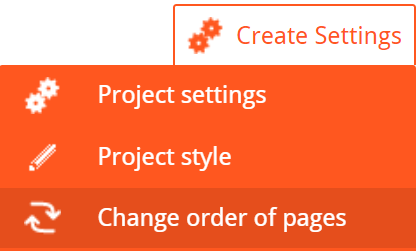
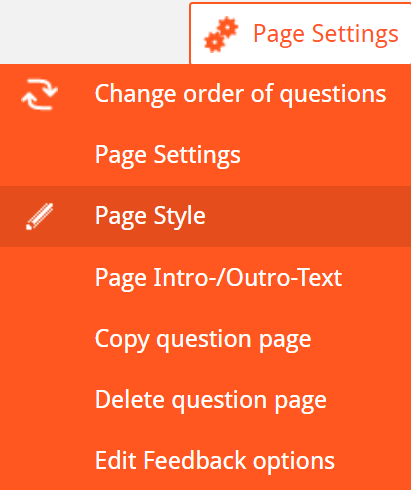
Manipulating the Intro page is questfox is easy as the Intro page receives it design from the question page Q1. Whatever you design in Q1 becomes the design of the intro. Here is the trick if you want to use a specific design for the intro:
Add an empty question page and move it to the position as Q1

Example of an intro page with positive effects on participation
The following example is pretty easy to set up following those instructions.
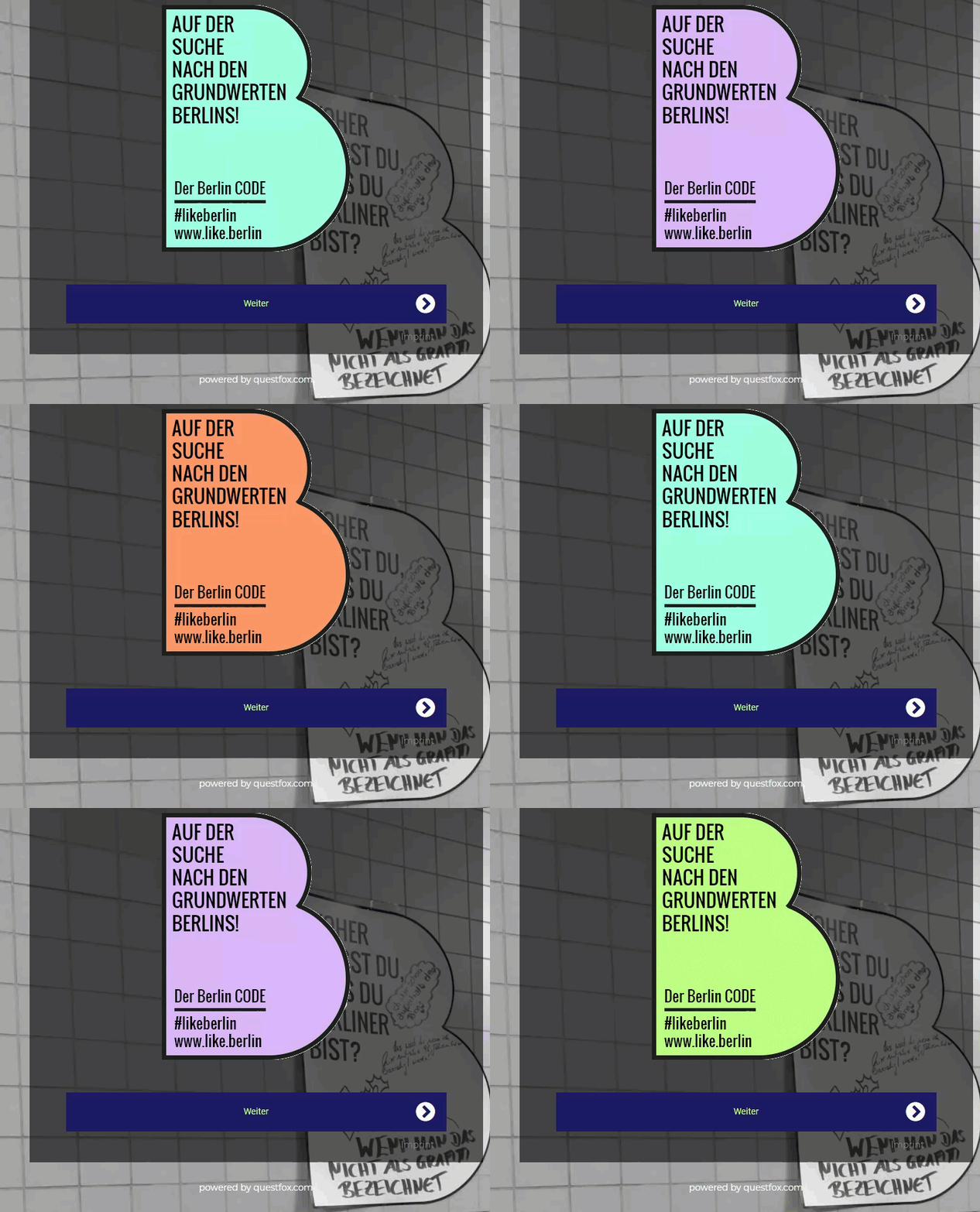
- Upload animated GIF in the middle of a white INTRO Text

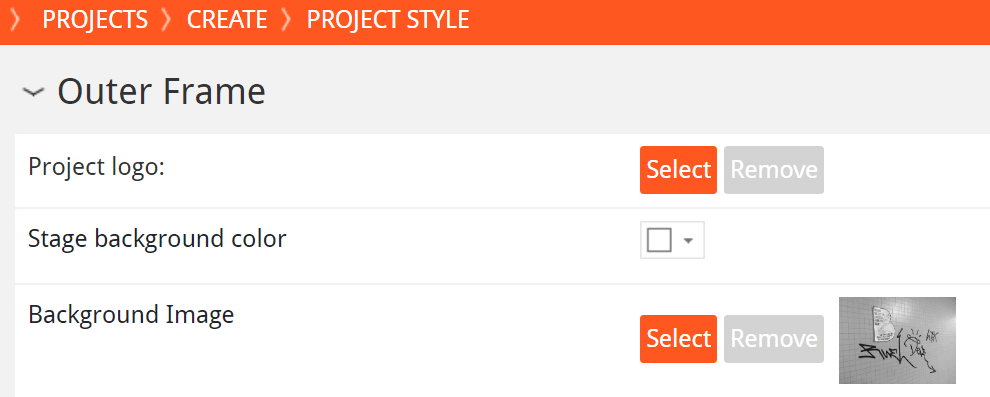
- Big Photo uploaded in the background of the outer frame under Project Style
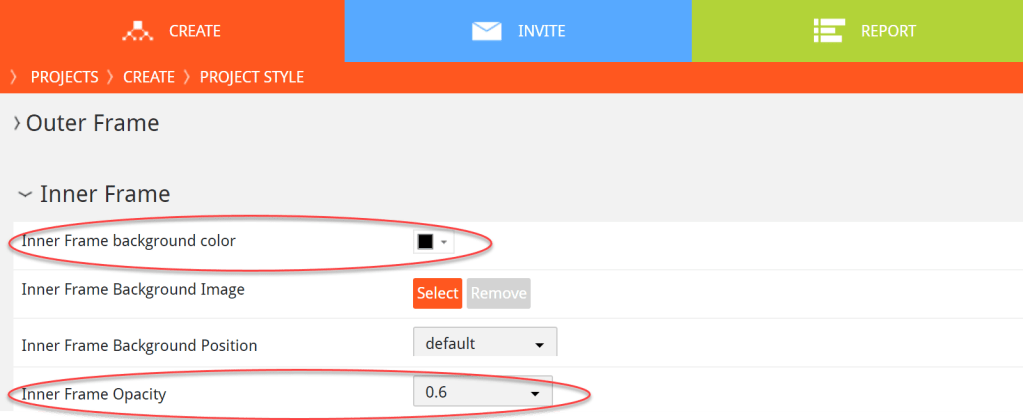
- Set color of the inner frame to black and Opacity to 0,6
Hope this helps you think about the motivating intro. Looking forward to see you create marvelous intros.
More inspiration on animated content under https://giphy.com/kochstrasse

The real voice: feature alert organizable folder structure for audio and video recordings
Posted: 4. April 2020 Filed under: Uncategorized Leave a commentMore and more of our customers are discovering the beauty of Voice or Video answering in research interviews.
The quality of the transcriptions is getting better day by day, but a lot of our users still like to record the audio file as a backup for the transcription (user’s conscent is always required).
With the growing number of recordings, the organisation of these files becomes difficult. Some project owners would like to save the files week by week. Some would like to organize the content by question number and just recently some users wanted to save these files organized in a separated folder for each participant separately.
From now on it is possible to define the way your audio/video files are stored.
Under Project Settings you can select
Organize audio/video file upload by…
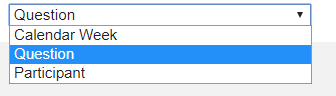
Default is organisation by QUESTION
This setting right away changes the way multimedia recordings are saved in your project. You will still find those files in the folder survey_uploads in the FileManager.
A glance at our future development. In order to save data and to make it more secure we will allow to user your own SFTP server for these uploads. Please allow us some weeks before we can officially publish this security update.
Update November 2020: The SFTP Connection to your own server is ready to be used. More details under:
https://questfox.wordpress.com/2020/11/01/clients-sftp-server-integration-for-audio-files
questfox Special Vocabulary Training for Speech2Text with new OOV feature
Posted: 9. December 2019 Filed under: Uncategorized | Tags: OOV, questfox, real voice of the customer, Speech-to-Text, transcription Leave a commentOOV – Out of vocabulary – questfox is sometimes leaving us speechless.
Week by week we see incredible advances in the development of our speech-to-text approach inside of questfox. One of the everlasting challenges is the wrong transcription of words which are not correctly understood in a specific context.
If something is misspelled by a computer this normally happens when the word used is outside the standard vocabulary of the application. This tends to happen often when words are used in a company specific context. By the way this seems to be true for every single market research project.
When asking about a brand some may be asking for competitors with a very special name and a very special spelling. In these cases the transcription technology tends to fail to recognize those specific names. Technically speaking the words used are “out of vocabulary” (OOV).
The questfox solution to the OOV problem: It is now possible to create a list of special words to be integrated in questfox. Everytime the transcription engine of questfox is used this list is sent to the transcription engine to have a better understanding of specific vocabulary used.
Here is our questfox experiment to test the tool with some less common brands
| Brand | Transcription without OOV List | Transcription with OOV List |
| questfox | questfox | questfox |
| pangea labs | Pangea Labs | pangea LabsPangea Labs |
| questlogix | auslogics Quest Logixx Quest logics | questlogix |
| Wisdom of Krauts | wisdom of crowds | wisdom of crowds |
| Tjaereborg Reisen | Sherlock Reisen Djerba Reisen sherbrooke reisen Djerba Kreisen | Tjaereborg Reisen |
| L’Oréal | Loreal | L’Oréal |
| Comme des Garçons | komm DKVkomm digga Song | comme de garcon Gasthaus.com Digger kommen die ganzen |
As you can see the overall transcription results do improve. But some issues remain.
Those who use mixed spoken language inside one dictation process may be familiar with the fact that transcription only works for one language at a time and hardly ever for two languages simultaneously.
As questfox works with an “expected language” tag for the transcription everything which is far away from the expected language is difficult to understand by the tool. In our pretest language German it was not possible to capture the french brand “Comme des Garçons”. We also failed with our made up brand “Wisdom of Krauts” which is still not transcripted in the desired way. The correct spelling seems to dominate the process and we get the undesired transcription result even after putting it into the list of special words. 😦
The only questfox way to “correct” this spelling would be the use of Regular Expressions in the questlogix. By the way: questlogix is such a distinct word with no similarity in the dictionary that our integration in the list of special words did function right away. Here is how to use RegEx in questfox:
Even while still in development we hope that you appreciate the publication of this feature and share your experience with us.
At first we defined the usage based on each questfox project as we believe that every specific project might have the same vocabulary issues inside one project. You can define your individual “Bag of Words” in the projects settings
The syntax is separate each word by comma. If you have several words just use them in a row
Word, word, word, combination of words,
Our typical list would be
questfox, pangea labs, questlogix, what’s your quest?, Speech2Text
In questfox you can paste one list of words per project under
->Project Settings
-> Special List of Words for Transcription / Out of Vocabulary (OOV)

Please share your gained knowledge about this feature.
Update Speech2Text in questfox #time #confidencescore #realvoiceofthecustomer
Posted: 12. November 2019 Filed under: Uncategorized Leave a commentWith every study we learn about new requirements in the brand new world of speech in research. After some thousands of interviews we realized, that two additional informations are always demanded by the users of questfox when using the automatic transcription features.
- Duration of a speech answer
There are several reasons why it makes sense to track the answering time. The API business is counting the seconds and makes us pay for their services. The researcher wants to know if people really take the time to answer. And brand new analytics tools for emotional voice analysis require a minimum answer time before their services can be used (eg. 7 seconds minimum). Even before one could implement the time measurement on a questfox page (para data). But as it only measured the time between appearance and pressing the “next” button, we now become more precise by only counting the seconds, the microphone was used. - Transcription Confidence Score
The confidence score between 0 (worst) and 1 (perfect transcription) is an educated guess about the quality of the transcript. After testing this feature with an extra question type we finally integrated it into all transcription question types as it is often demanded.
See the explanations on the transcription confidence score in this prior post from Mai 2019
You will all take advantage of those features right away. The only inconvenient thing is, that you will have to integrate the question types again from scratch, as the old versions will no longer function. Sorry for this inconvenience, but the advantages of using those desired features are only a click away for you now.
The video question type does not cover that feature set yet. We will keep you informed if this new feature will also be available in the world of video.
Voices of pangea: 120 languages supported in voice and video question types in questfox for real-time transcription
Posted: 4. November 2019 Filed under: Uncategorized | Tags: pangaea, pangea, pangea labs, questfox, real voice of the customer, speech in research, supercontinent Leave a commentpangea or pangaea?
The questfox development is managed by the Swiss company pangea labs. The idea of “pangea” was developed by the German researcher Alfred Wegener who described in this work “The Origin of Continents” (1912) the idea of a supercontinent, in times when all continents have been one.
See https://en.wikipedia.org/wiki/Pangaea
Our company was called pangea labs after a project in 120 countries after which we reconsidered our business figuring that our mission was to bring all people on this now different planet back together again with software tools. This happened in 2006 in just one language which was English.
We are more than proud to announce a real pangea feature with the implementation of a set of 120 languages and variants of languages inside of questfox from now on. It is now possible to interview using the voice of the customer in the languages described underneath. questfox will be able to generate a text transcript from the selected language.
120 speech variants ready to be used in questfox
A user can select from a list of the following variants of a language. We know that this is a major step for the development of market research. We are aware of the fact that now everyone will be able to use that technology yet, but our mission is to support the planet with these kinds of tools to re-create the supercontinent on the basis of software.
The integrated languages are available for Voice and even video question types. The text-to-speech reading features are not yet supported.
Here is the list of languages already available in questfox (November 2019):
| Language | Language (German Name) |
| Afrikaans (Suid-Afrika) | Afrikaans (Südafrika) |
| አማርኛ (ኢትዮጵያ) | Amharisch (Äthiopien) |
| Հայ (Հայաստան) | Armenisch (Armenien) |
| Azərbaycan (Azərbaycan) | Aserbaidschanisch (Aserbaidschan) |
| Bahasa Indonesia (Indonesia) | Indonesisch (Indonesien) |
| Bahasa Melayu (Malaysia) | Malaiisch (Malaysia) |
| বাংলা (বাংলাদেশ) | Bengalisch (Bangladesch) |
| বাংলা (ভারত) | Bengalisch (Indien) |
| Català (Espanya) | Katalanisch (Spanien) |
| Čeština (Česká republika) | Tschechisch (Tschechische Republik) |
| Dansk (Danmark) | Dänisch (Dänemark) |
| Deutsch (Deutschland) | Deutsch (Deutschland) |
| English (Australia) | Englisch (Australien) |
| English (Canada) | Englisch (Kanada) |
| English (Ghana) | Englisch (Ghana) |
| English (Great Britain) | Englisch (Großbritannien) |
| English (India) | Englisch (Indien) |
| English (Ireland) | Englisch (Irland) |
| English (Kenya) | Englisch (Kenia) |
| English (New Zealand) | Englisch (Neuseeland) |
| English (Nigeria) | Englisch (Nigeria) |
| English (Philippines) | Englisch (Philippinen) |
| English (Singapore) | Englisch (Singapur) |
| English (South Africa) | Englisch (Südafrika) |
| English (Tanzania) | Englisch (Tansania) |
| English (United States) | Englisch (USA) |
| Español (Argentina) | Spanisch (Argentinien) |
| Español (Bolivia) | Spanisch (Bolivien) |
| Español (Chile) | Spanisch (Chile) |
| Español (Colombia) | Spanisch (Kolumbien) |
| Español (Costa Rica) | Spanisch (Costa Rica) |
| Español (Ecuador) | Spanisch (Ecuador) |
| Español (El Salvador) | Spanisch (El Salvador) |
| Español (España) | Spanisch (Spanien) |
| Español (Estados Unidos) | Spanisch (USA) |
| Español (Guatemala) | Spanisch (Guatemala) |
| Español (Honduras) | Spanisch (Honduras) |
| Español (México) | Spanisch (Mexiko) |
| Español (Nicaragua) | Spanisch (Nicaragua) |
| Español (Panama) | Spanisch (Panama) |
| Español (Paraguay) | Spanisch (Paraguay) |
| Español (Perú) | Spanisch (Peru) |
| Español (Puerto Rico) | Spanisch (Puerto Rico) |
| Español (República Dominicana) | Spanisch (Dominikanische Republik) |
| Español (Uruguay) | Spanisch (Uruguay) |
| Español (Venezuela) | Spanisch (Venezuela) |
| Euskara (Espainia) | Baskisch (Spanien) |
| Filipino (Pilipinas) | Philippinisch (Philippinen) |
| Français (Canada) | Französisch (Kanada) |
| Français (France) | Französisch (Frankreich) |
| Galego (España) | Galizisch (Spanien) |
| ქართული (საქართველო) | Georgisch (Georgien) |
| ગુજરાતી (ભારત) | Gujarati (Indien) |
| Hrvatski (Hrvatska) | Kroatisch (Kroatien) |
| IsiZulu (Ningizimu Afrika) | Zulu (Südafrika) |
| Íslenska (Ísland) | Isländisch (Island) |
| Italiano (Italia) | Italienisch (Italien) |
| Jawa (Indonesia) | Javanisch (Indonesien) |
| ಕನ್ನಡ (ಭಾರತ) | Kannada (Indien) |
| ភាសាខ្មែរ (កម្ពុជា) | Khmer (Kambodscha) |
| ລາວ (ລາວ) | Lao (Laos) |
| Latviešu (latviešu) | Lettisch (Lettland) |
| Lietuvių (Lietuva) | Litauisch (Litauen) |
| Magyar (Magyarország) | Ungarisch (Ungarn) |
| മലയാളം (ഇന്ത്യ) | Malayalam (Indien) |
| मराठी (भारत) | Marathi (Indien) |
| Nederlands (Nederland) | Niederländisch (Niederlande) |
| नेपाली (नेपाल) | Nepalesisch (Nepal) |
| Norsk bokmål (Norge) | Norwegisch (Norwegen) |
| Polski (Polska) | Polnisch (Polen) |
| Português (Brasil) | Portugiesisch (Brasilien) |
| Português (Portugal) | Portugiesisch (Portugal) |
| Română (România) | Rumänisch (Rumänien) |
| සිංහල (ශ්රී ලංකාව) | Singhalesisch (Sri Lanka) |
| Slovenčina (Slovensko) | Slowakisch (Slowakei) |
| Slovenščina (Slovenija) | Slowenisch (Slowenien) |
| Urang (Indonesia) | Sundanesisch (Indonesien) |
| Swahili (Tanzania) | Swahili (Tansania) |
| Swahili (Kenya) | Swahili (Kenia) |
| Suomi (Suomi) | Finnisch (Finnland) |
| Svenska (Sverige) | Schwedisch (Schweden) |
| தமிழ் (இந்தியா) | Tamilisch (Indien) |
| தமிழ் (சிங்கப்பூர்) | Tamilisch (Singapur) |
| தமிழ் (இலங்கை) | Tamilisch (Sri Lanka) |
| தமிழ் (மலேசியா) | Tamilisch (Malaysia) |
| తెలుగు (భారతదేశం) | Telugu (Indien) |
| Tiếng Việt (Việt Nam) | Vietnamesisch (Vietnam) |
| Türkçe (Türkiye) | Türkisch (Türkei) |
| اردو (پاکستان) | Urdu (Pakistan) |
| اردو (بھارت) | Urdu (Indien) |
| Ελληνικά (Ελλάδα) | Griechisch (Griechenland) |
| Български (България) | Bulgarisch (Bulgarien) |
| Русский (Россия) | Russisch (Russland) |
| Српски (Србија) | Serbisch (Serbien) |
| Українська (Україна) | Ukrainisch (Ukraine) |
| עברית (ישראל) | Hebräisch (Israel) |
| العربية (إسرائيل) | Arabisch (Israel) |
| العربية (الأردن) | Arabisch (Jordanien) |
| العربية (الإمارات) | Arabisch (Vereinigte Arabische Emirate) |
| العربية (البحرين) | Arabisch (Bahrain) |
| العربية (الجزائر) | Arabisch (Algerien) |
| العربية (السعودية) | Arabisch (Saudi-Arabien) |
| العربية (العراق) | Arabisch (Irak) |
| العربية (الكويت) | Arabisch (Kuwait) |
| العربية (المغرب) | Arabisch (Marokko) |
| العربية (تونس) | Arabisch (Tunesien) |
| العربية (عُمان) | Arabisch (Oman) |
| العربية (فلسطين) | Arabisch (Palästina) |
| العربية (قطر) | Arabisch (Katar) |
| العربية (لبنان) | Arabisch (Libanon) |
| العربية (مصر) | Arabisch (Ägypten) |
| فارسی (ایران) | Persisch (Iran) |
| हिन्दी (भारत) | Hindi (Indien) |
| ไทย (ประเทศไทย) | Thailändisch (Thailand) |
| 한국어 (대한민국) | Koreanisch (Südkorea) |
| 國語 (台灣) | Chinesisch, Mandarin (traditionell, Taiwan) |
| 廣東話 (香港) | Chinesisch, Kantonesisch (traditionell, Hongkong) |
| 日本語(日本) | Japanisch (Japan) |
| 普通話 (香港) | Chinesisch, Mandarin (vereinfacht, Hongkong) |
| 普通话 (中国大陆) | Chinesisch, Mandarin (vereinfacht, China) |
3 Clicks away from your mother tongue in research
The languages are selected under question settings
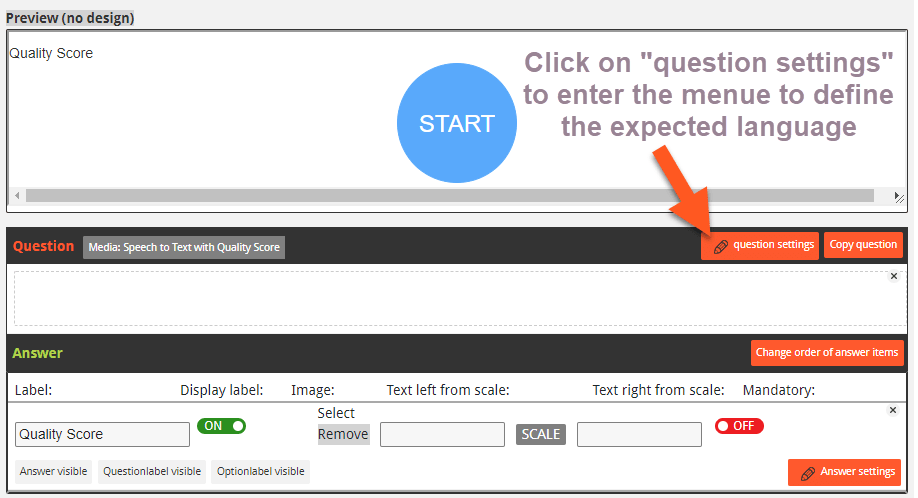
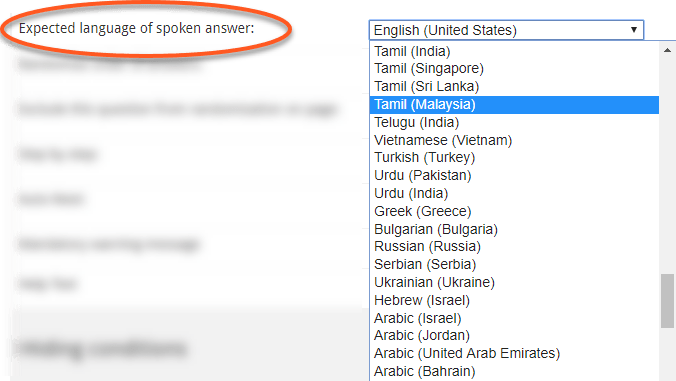
Using speech in research still requires some technical tests upfront, but is a fantastic new feature and broadens the opportunities of research. We will continuously work on these feature sets and support the world with more and more pangea ideas soon.
How to analyze speech?
The voice of a person is transcribed into written text in questfox. As an option you can save the spoken word as an audio file. At the moment questfox will only offer you a look at the data but is not providing any specific analytic tools for voice or text. Little by little we develop these analytic parts together with software partners specialized in that field of research. Over time more and more partners will be able to offer analytic tools in their specific language. That is the return of the supercontinent pangea.
#questfox major update alert: 41 languages supported by questfox speech module for research #therealvoiceofthecustomer
Posted: 7. October 2019 Filed under: Speech2Text, Uncategorized | Tags: speech in research Comments Off on #questfox major update alert: 41 languages supported by questfox speech module for research #therealvoiceofthecustomer
We know that the answer to all questions of the universe is 42. And we are getting there soon and even beyond. In our constant development towards new forms of research interaction we are integrating more and more languages into questfox.
At this point in time we managed to integrate 8 different languages with their respective versions spread around the world. See our interactive map of supported languages
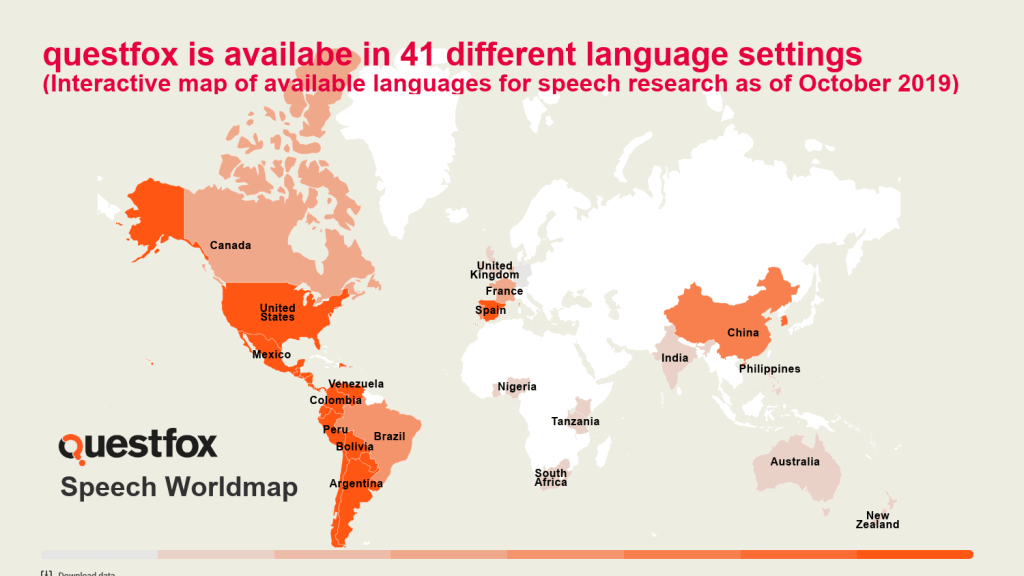
We are well aware of the fact that this only the beginning. We need to integrate the needs of the entire planet in order to bring continents back together again. We are pangea labs and we are establishing one world of understanding with no boarders in our minds.

By now we group these functions under “Multimedia Insights”. Perhaps it is even time for a new paradigm in asking questions. Research will not remain the same when using speech.
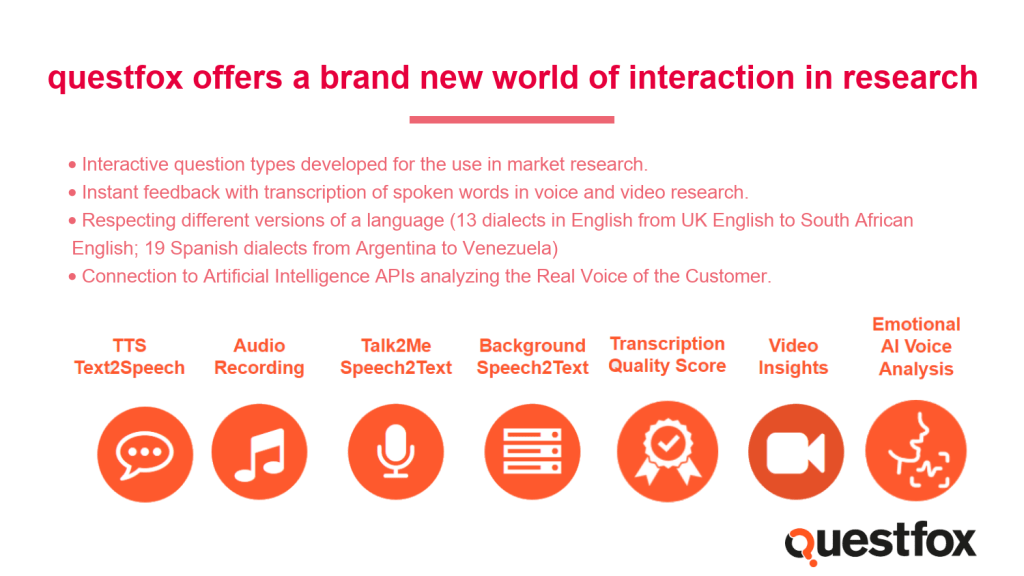
We are looking forward to your suggestions about the use of speech in research. Contact us under info@questfox.com



 questfox News