Distinguishing invitation groups in e-mail invitations with questfox
Posted: 31. March 2018 Filed under: Uncategorized Leave a commentquestfox allows to use different invitation groups in the e-mail invitation process.
What are invitation groups?
By using invitation groups one can better control the sample by inviting different people separately into a survey. A simple invitation group may be male vs. female. A complex invitation group may be age categories or differentiations of client descriptions.
While uploading your e-mail addresses make sure, that you have assigned a value to each case containing the invitation group’s value. The group can be a standard alphanumeric value. So you can really call the group “female”, “male” “unknown” etc. Attention: the selection of the group in the process is case sensitive. “Test” is not equal to “test”
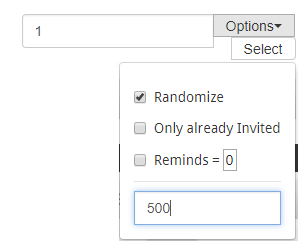
During the invitation it is then possible to select people out of a defined group. Just type in the group name and define how many of those group members you would like to select from the list


Under Options it is possible to apply some additional features:
- Randomization
- Amount of reminds (default=0)
- Number of selections from the list
In the following example 500 respondents from the group “1” are randomly selected.
Depending on the size of your sample the selection process may take a while. Please wait for your browser to have finished the selection process.
If you plan to work through your list step by step you can also do several selections at a time before inviting the selected potential respondents. Example: Select 500 from group 1 and then 300 from group 2 etc.
These powerful features will help you to create better samples. With the soon to come functionality of scheduling e-mail invitations this will make your research better with less work needed.
Grid Lines in questfox Living Reports can be switched off
Posted: 23. March 2018 Filed under: Uncategorized Leave a commentA small improvement before the week-end starts: A simple setting in the charting settings of the questfox living report chart visualisation allows you to just not show any grid lines. It is not much, but it helps.
Here is before…
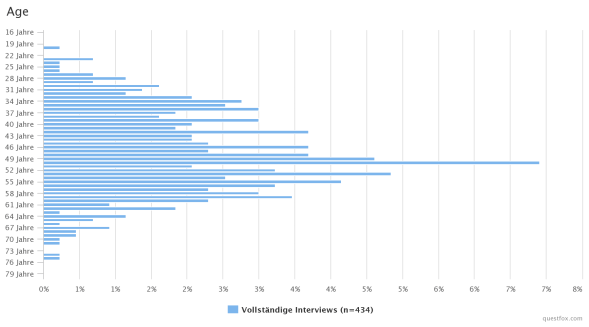
…changing the setting Show Grid Lines

… and after:
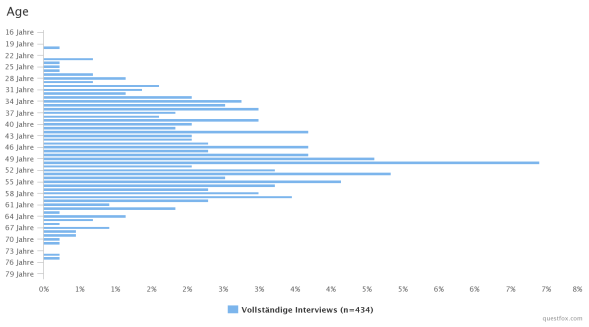
With this simple improvement your creativity of creating living reports is a little less limited to the technical barries. Just test it….
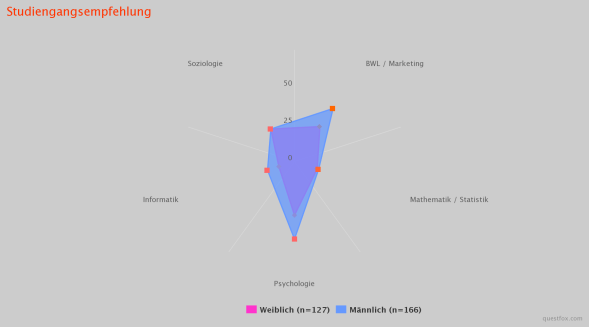
Image and Video pre-load for graphical stimulus control in questfox
Posted: 6. March 2018 Filed under: Uncategorized Leave a commentWith the new features of questfox more and more users are incorporating graphical stimuli into survey with exact time measurement. Some projects use more than 20 MB of graphical material during one survey. Even though we would always recommend to compress the data to the maximum possible still there is the issue of loading time of graphical material.
Our development team is happy to announce the integration of a background pre-loading mechanism for graphical stimuli inside of questfox.
The snippet can be integrated in any HTML question page in your questfox project. Just make sure that you allow enough time for your stimulus material to be loaded before showing it to your respondents.
This is the snippet that you might want to put into a hidden question inside of a questfox question. Please make sure, that you exchange the filenames with the right directory.
<!–
var images = new Array()
function preload(FILENAME:here) {
for (i = 0; i
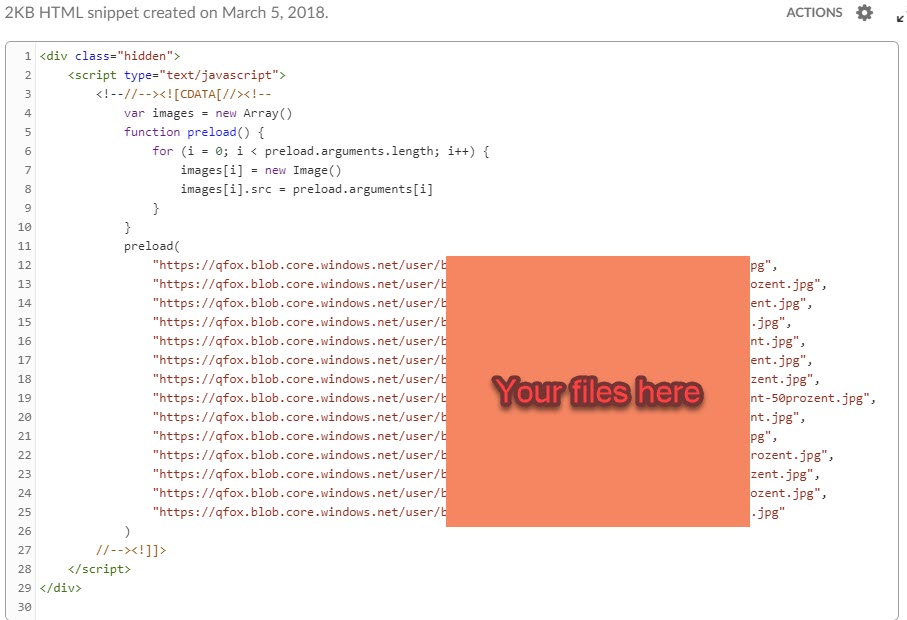
In case you want to test a video in the survey it makes sense to pre-load this video into the cache of a participant’s browser before you show it later by using the style=”display: none;”.
<p><video style="display: none;" src="https://YOUTVIDEOFILE.mp4" autoplay="autoplay" muted="" width="300" height="150"> </video></p>Tachistoscope in questionnaires with questfox
Posted: 3. March 2018 Filed under: Uncategorized Leave a commentIn the old day a tachistoscope was a hardware device allowing to control the exposition of a picture for an exactly controlled amount of time. This was heavily used in psychology and marketing to figure out effects of understanding and processing time of the human brain.
questfox allows a similar function in the world of software. A tachistostoscope feature can be easily implemented into questfox by setting a time frame for the exposition of a stimulus.
After creating any kind of question page you can define an amount of time in which questfox automatically presses next. The questionnaire will move on after this defined time.
If you want to force the respondents to pass a defined minimum amount of time on the page you can additionally define the delay in seconds.
Here is the setting unter Page Settings 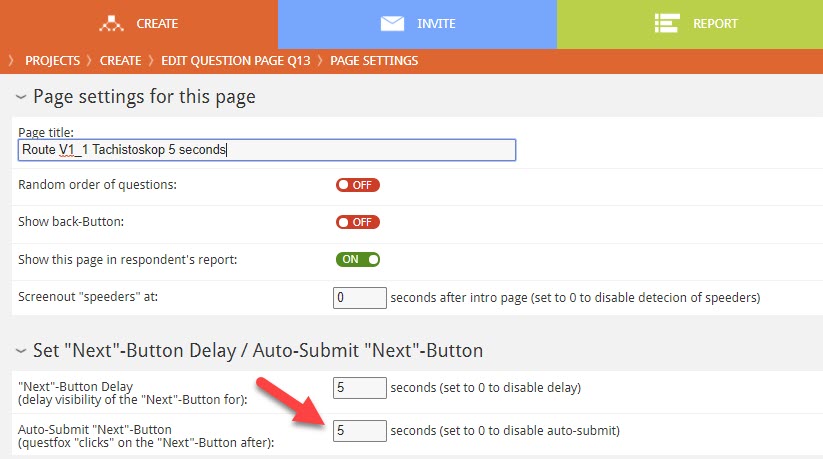
Make sure, that your approach is doable for your selected respondents and also think about the needed loading time for pictures before measuring the time.
This feature can also be used to set time pressure to respondents in choice tasks etc.
questfox Multimedia Insights Toolbox launched: Voice and Camera Insights for market research
Posted: 22. January 2018 Filed under: Multimedia Insights, Speech2Text | Tags: Multimedia Insights Leave a comment
The questfox development team proudly announces the completion of the Multimedia Insights toolbox. New features in the world of asking questions are available in questfox. Apart from clicks and sliders, we are developing new forms of interactions with still & moving pictures and additional voice features.
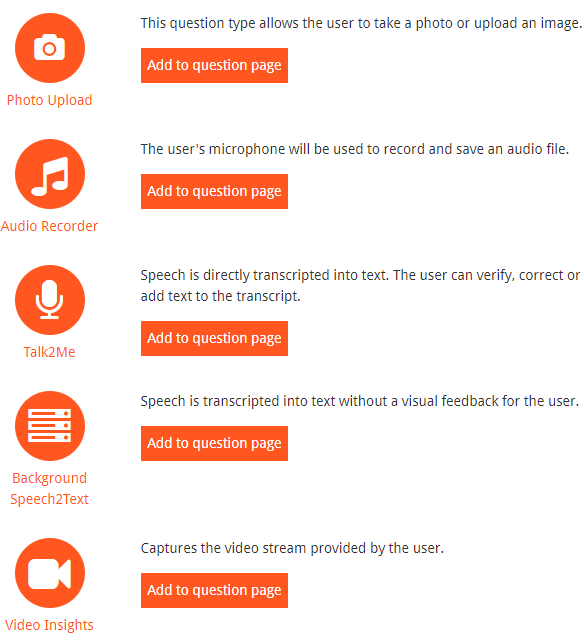
The new “Multimedia Insights” toolbox offers 5 different question types which are supposed to trigger the willigness to answer based on new interaction formats. It is supposed to work browser based without application installed. The only thing you need is a modern browser supporting the use of a microfone or a camera.
The following features can now be selected inside of questfox:
The idea of our development comes from a pop song: Ain’t no stopping us now.
TinSort Tricks in questfox
Posted: 1. December 2017 Filed under: Uncategorized Leave a comment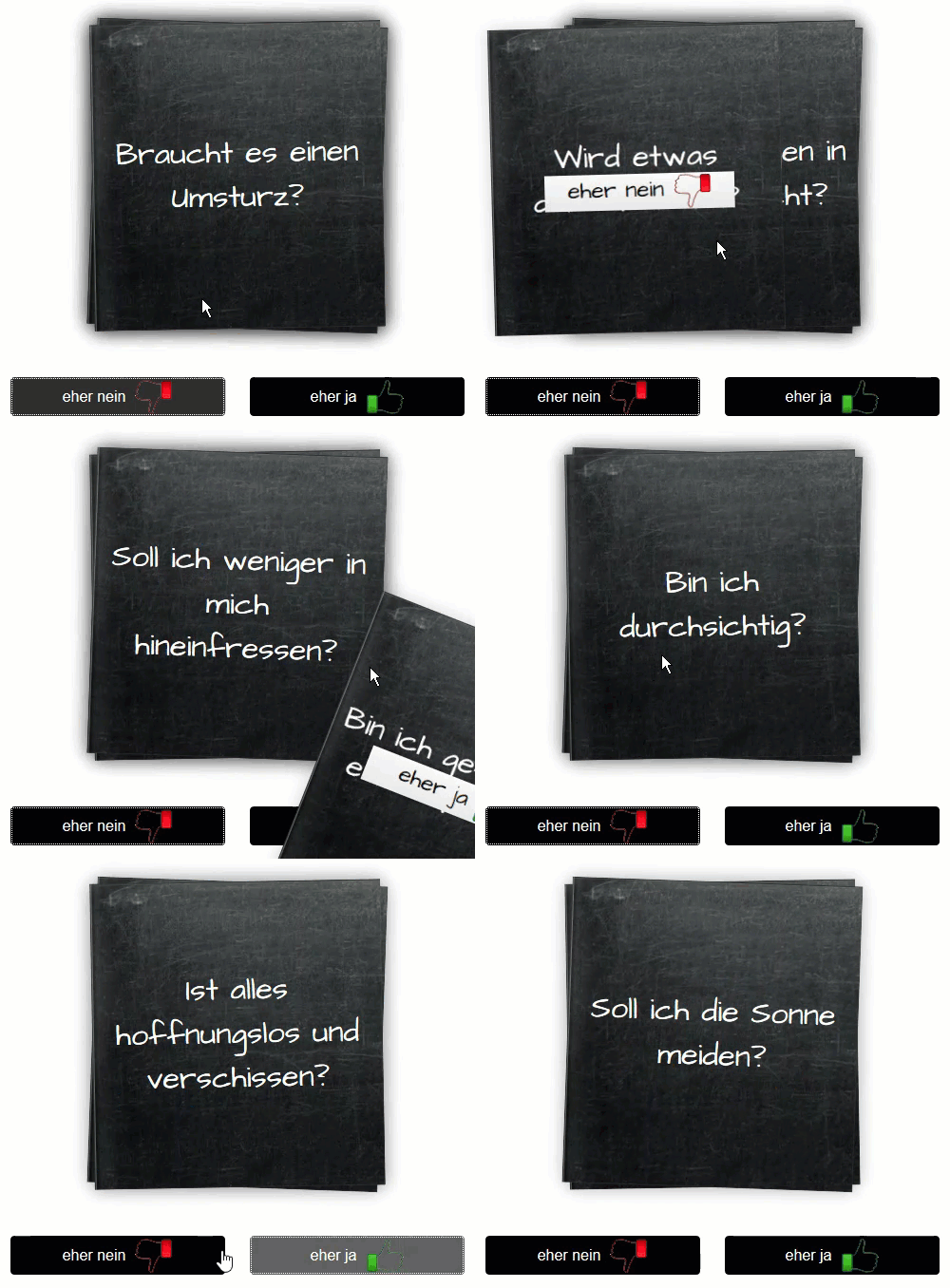
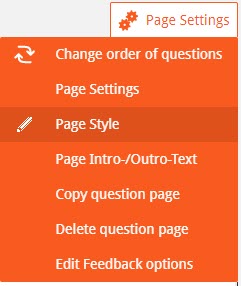
Here are some hints on how to manipulate design features:
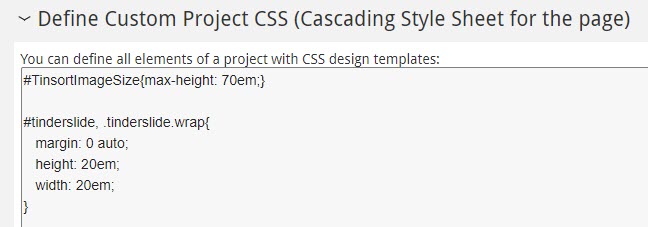
margin: 0 auto;
height: 16em;
width: 12em;
}
#tinderslide > ul > li{
background-image:url(“https://qfox.blob.core.windows.net/user/DigitalFutur/05_screen_backgrounds/blackboard_wallpaper.jpg”;);
}
Manipulating fonts is also possible
#tinderslide > ul > li> div > div.answerTitle.ng-binding.ng-scope{
font-size:1.5em;
}
Definition of Picturesize
#TinsortImageSize{max-height: 15em;}
questfox external ID issues when working with commercial panels
Posted: 10. November 2017 Filed under: Uncategorized Leave a commentEvery commercial panel has its own definition of incoming and outgoing links when it comes to invitations and questionnaire reactions like screen-out; quota-full or different forms of completition.
A small new feature allows questfox users to use the external ID from a panel provider inside a questfox variable. You can use this feature to redirect participants into different branches while using variants of the ID.
The code for the external ID to be used inside of questfox is simply: qf_ExternalID
Create your hidden text variable and integrate a copy of the external ID inside your project using questlogix’ data calculation.
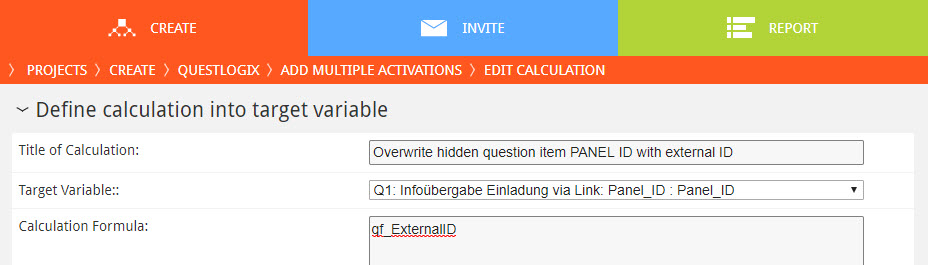
Use your new variable for further re-directs later.
questfox feature alert: “calculations” with text values possible
Posted: 10. November 2017 Filed under: Uncategorized Leave a commentSome of our users demanded more features in questlogix dealing with text. Not a lot of people calculate with text, but with the upcoming voice features we are in need of questlogix that are able to change text input based on defined conditions. Text input can now be changed by the questlogix calculation procedure: It can be used for re-coding and cleaning of data sets.
The new thing is just the fact, that a questfox user can now manipulate text entries with questlogix. Does not sound like much? It is a big step into the new world of using speecht2text answers in analytics. The usage of boolean checks for text will follow soon.
questfox ahead of times compared to Apple when it comes to media capturing
Posted: 5. September 2017 Filed under: Speech2Text | Tags: Apple, canisuse.com, Device Agnostic, questfox, Talk2Me Leave a commentWe are very proud of our most recent development in speech2text recognition and automated analysis for market research. While still testing the new technology we face issues with some browsers in the market. Our approach is “device agnostic” and should be functional independently from devices or operating systems.
A lot of decision makers tend to use Apple devices and struggle with the new Talk2Me functionalities on their very expensive phones. They right away believe that something is wrong with questfox. Sorry guys. We are ahead of times in terms of development compared to Apple when it comes to media capturing in browser. This time it is not us. It is Apple slowing down innovation.
For the first time in our development we have to aknowledge, that we cannot keep that device agnostic promise for our most recent development. Apparently our developers are ahead of the development of Apple with Safari. The new multimedia functions inside of questfox will only become usable on iOS and Safari with the launch of their new version 11. We are hoping for a quick release within the Apple environment, but this is definitively outside of our reach.
If you want to stay updated about the different functionalities check this website from time to time: http://caniuse.com/#search=getUserMedia()
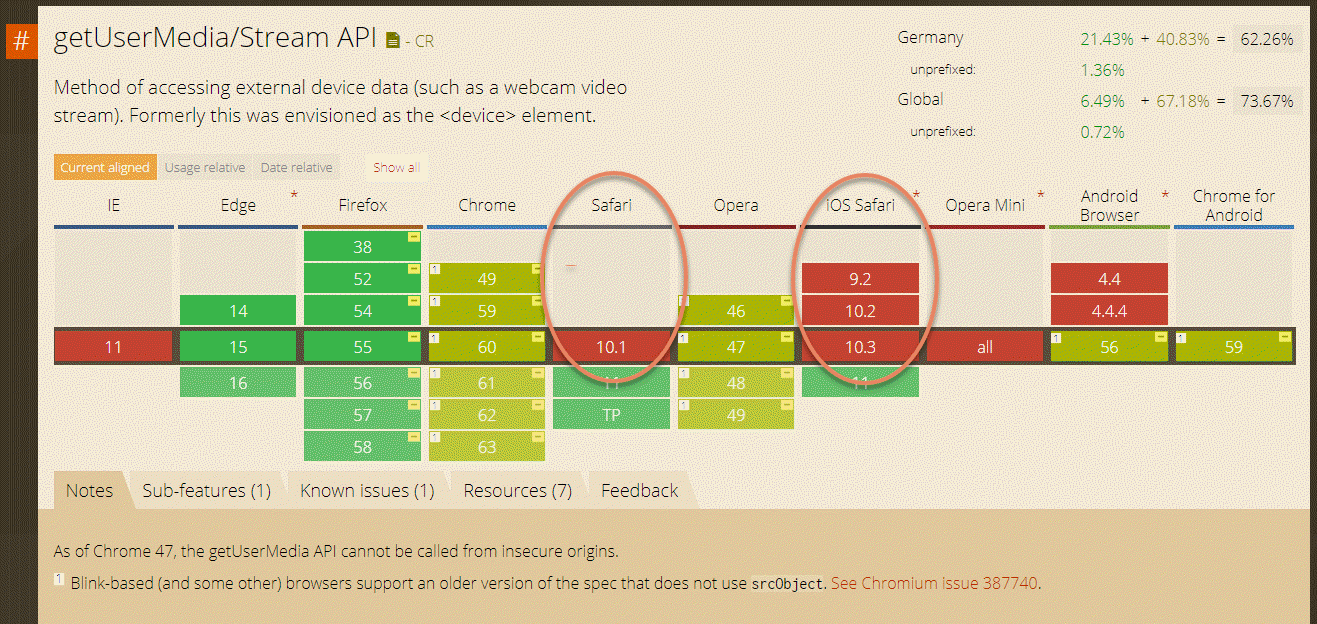
P.S. Internet Explorer is officially dead, but still operating on millions of computers. Hopefully Apple is forcing updates into their user base. Anyhow we try to stay in the first row of innovation knowing that we will lose some people sticking to older technology.
Talk2Me: questfox Digital Research Voice Assistant goes online
Posted: 15. August 2017 Filed under: Speech2Text, Technology | Tags: Digital Research Assistant Leave a commentWe are happy to announce, that a whole new category of breathtaking question types is out now and available in questfox.
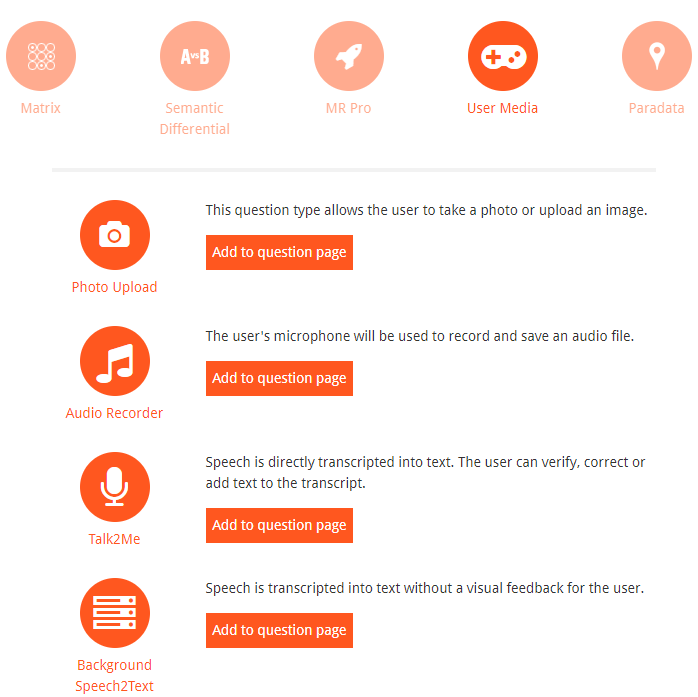
In the CREATE section you will now a find a new category called “User Media”.
Besides the function of a Photo upload we have fantastic new question sets ready to be used.
Talk2Me
questfox Digital Research Voice Assistant:
Automation in market research with speech2text technologies
Talk with devices becomes normal
Alexa, Cortana, and Ok, Google are currently the standard voice commands to ask for a digital assistant for help. Now a digital voice assistant is available for the first time in support of a market research interviews.
The team of pangea labs is dedicated passionately to the task of developing mobile methods for market research. Our software-as-a-service survey solution questfox now progressed to a milestone in the development of the survey interaction. It is with great pleasure that we announce today the implementation of a significant step in the development towards mobile methods. We present the questfox voice assistant Talk2Me: a fully integrated speech-to-text solution for verbal survey responses in the context of digital interviews.
MP3 to written text
A customer approached us with the idea to integrate original voice comments from customers in into market research using voice recording. So far not a new idea. As there are already similar methods available, we did not only wanted to meet this requirement, but converted the desire directly into a technical context of digital marketing research under the premise of increased automation. In the age of automation of market research, we did not only want to work with spoken text fragments work as MP3 file, but offer an integrated solution that solves the problem of analyzing large amounts of text. To deliver these verbal answers directly to an evaluation, we have in addition to the voice recorder technology implemented a speech-to-text feature, which transforms the spoken language into written text.

Three new audio question types for market research available in questfox
Total questfox now has three new types of questions for language market research:
| questfox question type | Functionality |
 |
Audio Recorder:The Audio Recorder records spoken language and allows later to listen to the recorded language. This type of question is suitable for sound bites from consumers. In a classical research process, this type of question would have to be transcribed later. |
 |
Talk2Me: This new type of question translates the spoken language into text on the fly. The user can then adjust and correct the text before continuing. The recording can be triggered multiple times within this issue in order to give longer thought into sections on record. |
 |
Background Speech2text: The first tests with live converting spoken language into written text has frightened some users. To avoid this effect, a variant has been implemented in questfox. With this question type the transformation takes place in the background. Here, the interviewee does not see the transformation of his spoken language while answering. |
All new questfox question types, the original audio format, and therefore are available for later purposes, such as integration into a client presentation.
questfox opens up new worlds of interaction in market research. We do not yet know all the consequences, but expect massive changes in the interaction of research interviews.
Next step: sentiment analysis via API
The text data is ready for analysis in questfox with the existing evaluation tools. Creation of tagclouds etc. are right away possible. The next step is to integrate an API for semantic analysis of the text data. The intensive cooperation with the Cologne expert for textual analysis, insius, it will be possible to analyze the spoken texts later in form of semantic analysis.
Thus, we offer a total new way of data collection and automated analysis methods for the market research industry.
Market research internationally and soon globally
This seemingly small idea could lead to an increase of the use of consumer opinions. The written statement of the open text responses has always been a question of education of the interviewee and his ability and willingness to use a keyboard to express himself. In the future there will be fewer socio-demographic differences in the degree of filling of open answers. The digital voice assistant could even interview audiences who do not feel very comfortable in the written comments. They can now give their opinion openly and perhaps more spontaneously.
This new development will be perhaps more important, when we look in the direction of less developed countries with a low degree of literacy. With the digital language assistant in market research, it will be possible to interview people, who cannot read or write. The new technology will lead to larger target groups can be developed that were not accessible to market research so far. This is very advantageous for the questfox Digital Research Voice Assistant automatically detects the spoken language and transmits the text. Interviewing in English, German, Spanish, Italian and French are not a problem today. Other languages will follow.
questfox Digital Research Voice Assistant Process Overview of
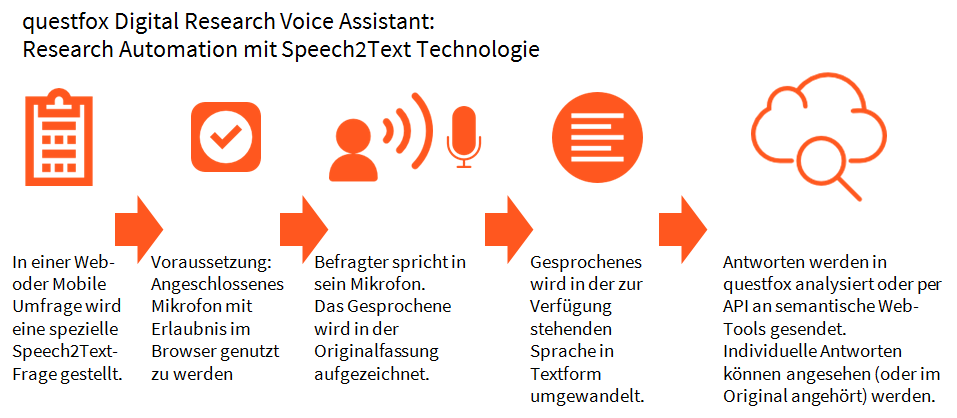
Requirements for the Digital Research questfox Voice Assistant
When searching for device-agnostic solutions, we strive to open the technology to as many people as possible without any additional effort needed. We have therefore targeted technologies that already allow interaction with language. Not all even modern browsers will be able to make speech recognition available in the context of a browser interaction. The questfox digital research voice assistant can therefore only be used when the browser technology supports a voice interaction. At the moment these are the browser from Google (Chrome), Firefox, Microsoft Edge, and Opera. To our great regret Apple Safari is not yet allowing such technology. With this technology setup it should be possible to carry out mobile speech questionnaires without installing an app.
Support of mobile Apps
We work in the next step in implementing the browser software into the questfox mobile research app, in which we ask the user’s permission for the acquisition of speech, so to use the microphone before interacting.
Disadvantages and fears
The first voices are raised, are afraid of digital assistants and suggest a permanent monitoring by activated microphones. We take these concerns very seriously and want to grant full control of their own responses collected through a survey questfox, the user. That is why with Talk2Me a two stage process available, where the user can first listen to his speech again and can make corrections even in the converted text form before he submits it. We will explore in usability testing whether this variant is acceptance.
We believe to be the first to offer this in German. Other languages are possible. It is then just a matter of the organization of the interview, if multiple languages are to be mixed in a study.
Costs
The costs are negligible compared to the currently performed manually transcribing voice files almost. The cloud-based model takes into account the time actually used, we provide our customer. This can vary greatly depending on the project. To avoid the first fear of contact, we plan to offer flat-rate packages that vary depending on the size, number of languages and requirements used in the evaluation.
For existing questfox users the access is for free for the moment. We expect you to make a fair use of the new functions.
 questfox News
