No more Excel, SPSS or other charting tools needed with questfox Instant Report
Posted: 9. February 2015 Filed under: Uncategorized Leave a commentForget about Excel or other charting tools. The creation of charts from live research projects has never been easier.
questfox Instant Report is charting live from questfox Data.
questfox now allows you to use a set of standard procedures for all kinds of charting like
Bar charts and Column charts


Pie Chart and Donut Chart


Line Chart and Area Chart


Radar Charts



And coming soon: The Tag Cloud

questfox can produce any kind of chart based on your questfox research data.
Very important: questfox offers a comparison of data groups in the charting.
One thing questfox still cannot do automatically: Make sure, that your data representation makes sense.
questfox® Instant Report launched
Posted: 16. January 2015 Filed under: Uncategorized Leave a commentThe new reporting stage is now permanently integrated into the SaaS-Solution questfox.The Alpha-Testing is over and we are now inviting you to try the new reporting stage that we call: questfox® Instant Report. Registered users will find the new button “Create Instant Report” in the Reporting Stage of questfox.com.
The concept of questfox® Instant Report is the idea of preparing a report before the survey even starts.
Create a new Report by clicking on

A list of questfox® Instant report features:
- Instant report from live data of market research surveys, quizzes or feedback questionnaires.
- Dashboard features to monitor the development and all content of a study.
- Parallel reports for different audience groupss. A single research project could create a number of separate reports using the same data base, but showing different things to different stakeholders. The data is updated live.
Multi-Client studies can be used and create separate reports, which is updated automatically and will be published separately. - Every item of the questionnaire can be used to either be reported or serve as a group split variable. The usage is easy and intuitive.
- Blog Features: questfox® Instant report is based on the idea of online blogging, which theoretically can have a infinite length. The report is always a combination of data, graphics, text, images and even videos. In the future, other HTML elements can be integrated so that the research might no longer be seen as a typical market research report.
- questfox® Instant Report is fully developed based on HTML 5 and is therefore a modern tool which automatically saves it in the browser and drag n ‘drop works. It should work on a lot of devices, but we stil run some tests.
- The representation of charts is always based on the data from the questfox survey engine and delivers results instantly. The design of the graphics is extremely flexible. One can hide, move or resize online items. It is so powerful that questfox® Instant report appears more flexible than the industry standard Excel for some of the graphical representations.
- A variety of graphic templates is already available. Here, the development team has focused on the key types of presentation graphs. Other types are gradually added
- All labels are always editable without having to change the questionnaire. All items axes and headings can always be adjusted manually.
- CSS Design for questfox® Instant Report: The questfox® Instant Report engine permits the use of CSS styles for the entire report. This allows to create fresh designs even within the corporate design rules.
- The idea of an online reporting leads directly to the idea of online distribution of reports. A Social Share option makes the report accessible even outside the questfox engine. An additional password protection can be added to secure a public report.
- So called Report Groups are the basis of the definition of group comparisons. Each interviewed or calculated item can later be used in questfox® Instant Report as the basis for benchmark comparisons.
- Unique formatted reports can be copied and saved with a different set of data analysis. In this way, different views on an issue can be created with one report.
- Social sharing: questfox® Instant report allows the sharing of the report in the usual social media.
Enjoy these marvelous new features and share the results that help this world to become a better place.
Instant reporting soon to be available in SaaS Software questfox.com
Posted: 13. January 2015 Filed under: Uncategorized Leave a commentNew features of advanced live reporting in questfox beta testing
Showing Matrix answers line-by-line in questfox. Improvement in usability for the respondent
Posted: 24. October 2014 Filed under: Uncategorized Leave a commentA new feature in the world of multidimensional questions is now available in questfox.
Some people are worried if respondents even care to read a question in a complex matrix questiontype. We now offer a pretty simple solution by showing every answer item line one after one. The moment, the answer to an item is clicked, the next line of items appears. Once you are done with the item list, you can control your answers before clicking next.
This is an example of the idea in questfox, where the next line of questions only pops-up after the first one was answered.
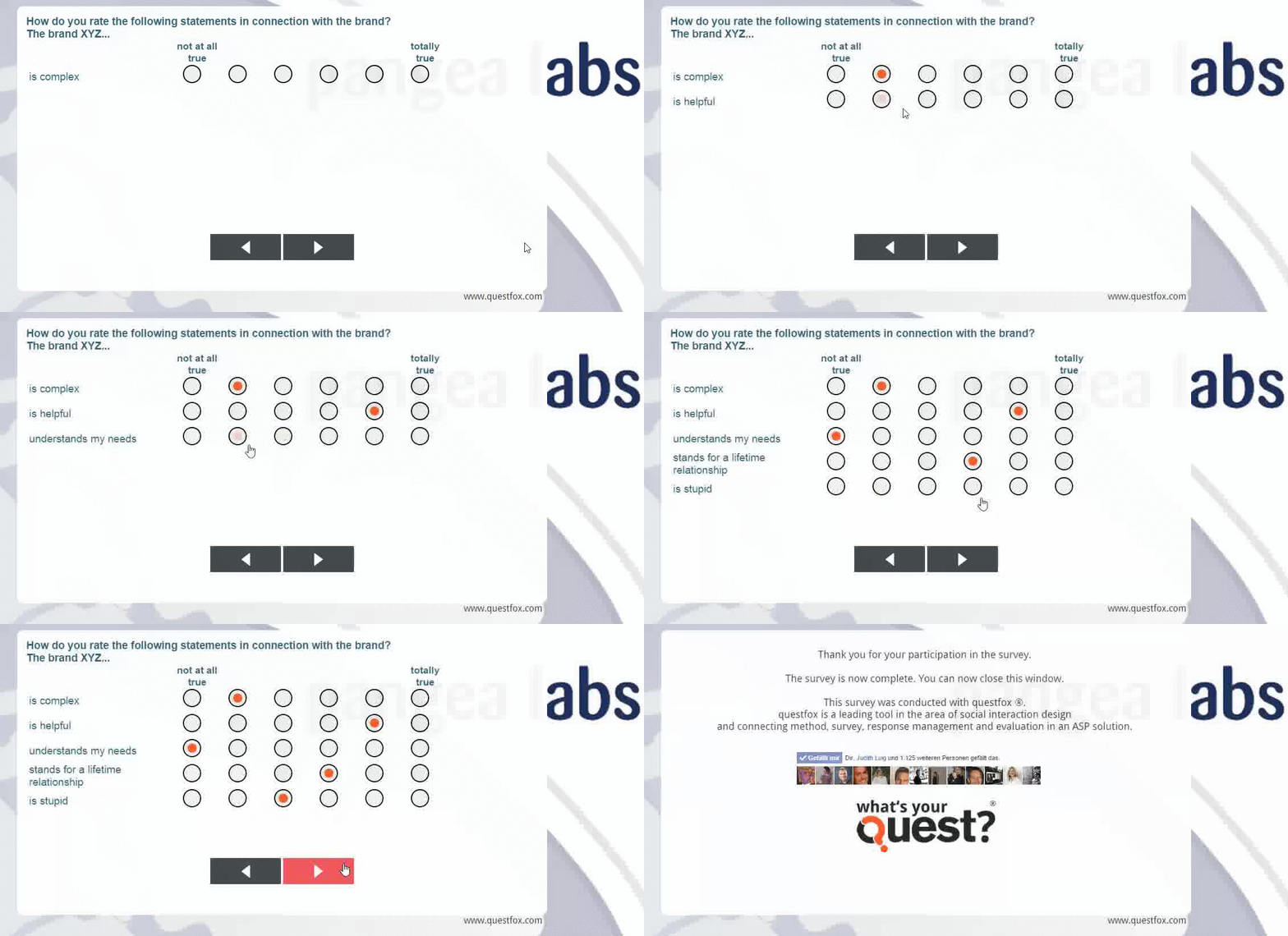
The fantastic feature does not require any programming skills. It is availabe in questfox under
MATRIX
EDIT QUESTION
QUESTION VISUALIZATION
Just set your Matrix question to “Show Answer item lines step-by-step”

We are working on the integration of this usability feature on different forms (semantic differential; price sensitivity meter …)
Optimization for mobile research in questfox
Posted: 10. July 2014 Filed under: Uncategorized Leave a commentAs new smartphone devices become more and more common in market research questfox tries to keep pace with the exploding market of device.
There are little changes in the background that you might have sensed already.
The moment questfox detects a mobile device, the following actions are automatically started:
– The NEXT Button automatically is set to the left side of the screen and moved closer to the question
– The entire page is no longer centered to the screen, but starting in the upper left corner
– Any project logo is NOT shown anymore in order to save the space for the questions
– The new feature of clicking anywhere on the answer or pictures of an item is applied in all versions of interviews.
We are working on different CSS stylesheets for the device jungle which we will provide to you on demand.
Please consider these changes to be minor fixes of an interface basically designed for the larger screen. We know that the interview interface needs a general brush-up too and we are working on this too…
QR Code for your questfox project: QRfox
Posted: 20. June 2014 Filed under: Uncategorized | Tags: QR Code in questfox; Mobile Research; Smartphone survey Leave a commentMore and more studies are performed on mobile devices with questfox.As it is still not convenient to type in an encrypted link format on a touch device our developers integrate a new fun feature which makes your live a little easier: The questfox QR Code.
On top of the screen, right behind the project link you will see a little icon showing a tiny QR symbol. Clicking on this symbol enlarges the QR code to a size which can easily be photographed with a smart phone.
The QR Image can also be saved with a right click and later be used for printing purposes. We decided to go for a bigger version of the code which can still be shrunk by the user.

QR Code for direct access to questfox
The feature can also be used in the INVITE Section where sometimes dozends of re-direct links are generated. Hope you will enjoy this feature of questfox.
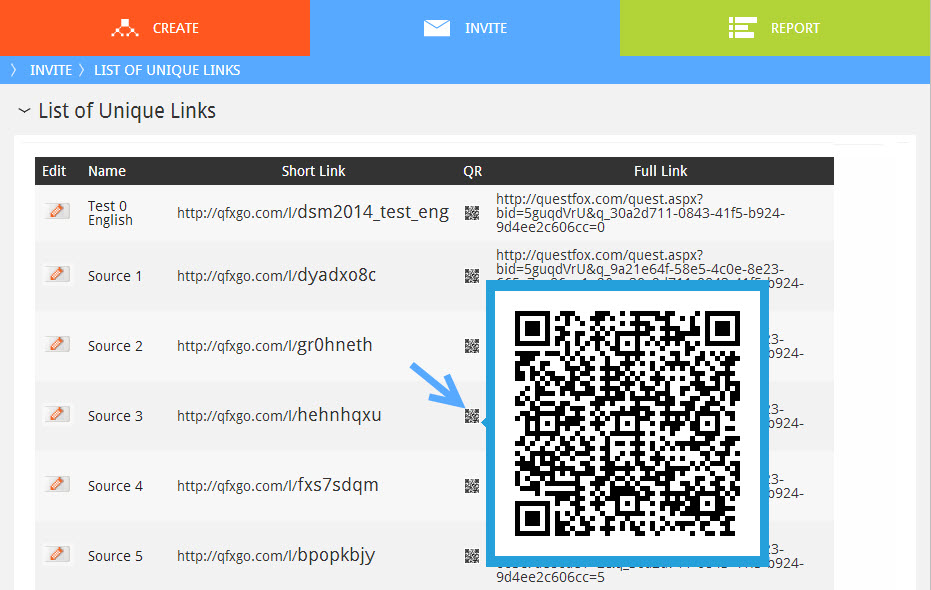
We already enjoyed testing it for mobile versions of our projects.
Project Live Stats Update in questfox
Posted: 17. June 2014 Filed under: Uncategorized Leave a comment
An updated overview of an ongoing project is now available by clicking “Statistics” on the upper right side of the screen.

The statistics view shows an overview of project details:

The completion rate is based on fully completed answers in relation to the amount of possible answers (without screen out and quota full candidates).
The helpful feature is always available on top of your project screen.
Fast preview now available in questfox
Posted: 17. June 2014 Filed under: Uncategorized Leave a commentWe now integrated a fast preview for question pages and decision trees.
By clicking the preview button inside a page you are automatically directed into the preview mode of this page without showing the intro page. Remember: Mandatory settings are not checked in preview mode (it’s not a bug… it’s a feature).
Again we saved you some valuable seconds of your lifetime. Use it!
questlogix updates online
Posted: 12. June 2014 Filed under: Uncategorized Leave a comment questfox received a brush-up in the questlogix section.
Not only the design is improved, but the function for panel interactions are now integrated in questlogix.
The setting of conditions allows to define even the most complex conditions.
Several action procedures are now available. After a condition is fulfilled questfox allows you to distinguish:
- Activation Procedures (Activation an Deactivation; Jump and Re-Direct)
- Live Calculations (Calculate on the fly during the interview=
- Live Reporting (Send Reports even while the interview is still in progress)
A new screen out feature can also mark interviews with the flag “quality issues”
Remember that questfox is fulfilling highest market research industry standards for the setting of very complex logics.

We often figure out, that the software is able to do all this easily, but the person defining the rules sometimes gets lost in complex projects.
Constant SUM in questfox with Live Check of SUM
Posted: 4. June 2014 Filed under: Uncategorized | Tags: Constant SUM; questfox Leave a commentEven though we are not huge fans of the methodology of a constant sum, we were pretty much forced into its questfox integration.
The constant sum question is checking a list of items for a sum which can be set at a defined value or range. questfox now automatically checks, whether the defined sum is reached.
Example: How do you evaluate the following features of a smartphone?
Please give points to each item which must sum up to 100 points
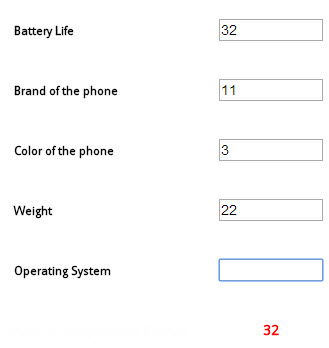
You will find this new question type under NUMBER

The first version is already integrated into questfox
Number typed in textbox incl. constant sum check
Please allow us to develop the awesome version of a graphical data input of the contant sum inside of questfox (perhaps we will become friends again with the very unliked constant sum)
Number selected with slider incl. constant sum check
 questfox News