Voices of pangea: 120 languages supported in voice and video question types in questfox for real-time transcription
Posted: 4. November 2019 Filed under: Uncategorized | Tags: pangaea, pangea, pangea labs, questfox, real voice of the customer, speech in research, supercontinent Leave a commentpangea or pangaea?
The questfox development is managed by the Swiss company pangea labs. The idea of “pangea” was developed by the German researcher Alfred Wegener who described in this work “The Origin of Continents” (1912) the idea of a supercontinent, in times when all continents have been one.
See https://en.wikipedia.org/wiki/Pangaea
Our company was called pangea labs after a project in 120 countries after which we reconsidered our business figuring that our mission was to bring all people on this now different planet back together again with software tools. This happened in 2006 in just one language which was English.
We are more than proud to announce a real pangea feature with the implementation of a set of 120 languages and variants of languages inside of questfox from now on. It is now possible to interview using the voice of the customer in the languages described underneath. questfox will be able to generate a text transcript from the selected language.
120 speech variants ready to be used in questfox
A user can select from a list of the following variants of a language. We know that this is a major step for the development of market research. We are aware of the fact that now everyone will be able to use that technology yet, but our mission is to support the planet with these kinds of tools to re-create the supercontinent on the basis of software.
The integrated languages are available for Voice and even video question types. The text-to-speech reading features are not yet supported.
Here is the list of languages already available in questfox (November 2019):
| Language | Language (German Name) |
| Afrikaans (Suid-Afrika) | Afrikaans (Südafrika) |
| አማርኛ (ኢትዮጵያ) | Amharisch (Äthiopien) |
| Հայ (Հայաստան) | Armenisch (Armenien) |
| Azərbaycan (Azərbaycan) | Aserbaidschanisch (Aserbaidschan) |
| Bahasa Indonesia (Indonesia) | Indonesisch (Indonesien) |
| Bahasa Melayu (Malaysia) | Malaiisch (Malaysia) |
| বাংলা (বাংলাদেশ) | Bengalisch (Bangladesch) |
| বাংলা (ভারত) | Bengalisch (Indien) |
| Català (Espanya) | Katalanisch (Spanien) |
| Čeština (Česká republika) | Tschechisch (Tschechische Republik) |
| Dansk (Danmark) | Dänisch (Dänemark) |
| Deutsch (Deutschland) | Deutsch (Deutschland) |
| English (Australia) | Englisch (Australien) |
| English (Canada) | Englisch (Kanada) |
| English (Ghana) | Englisch (Ghana) |
| English (Great Britain) | Englisch (Großbritannien) |
| English (India) | Englisch (Indien) |
| English (Ireland) | Englisch (Irland) |
| English (Kenya) | Englisch (Kenia) |
| English (New Zealand) | Englisch (Neuseeland) |
| English (Nigeria) | Englisch (Nigeria) |
| English (Philippines) | Englisch (Philippinen) |
| English (Singapore) | Englisch (Singapur) |
| English (South Africa) | Englisch (Südafrika) |
| English (Tanzania) | Englisch (Tansania) |
| English (United States) | Englisch (USA) |
| Español (Argentina) | Spanisch (Argentinien) |
| Español (Bolivia) | Spanisch (Bolivien) |
| Español (Chile) | Spanisch (Chile) |
| Español (Colombia) | Spanisch (Kolumbien) |
| Español (Costa Rica) | Spanisch (Costa Rica) |
| Español (Ecuador) | Spanisch (Ecuador) |
| Español (El Salvador) | Spanisch (El Salvador) |
| Español (España) | Spanisch (Spanien) |
| Español (Estados Unidos) | Spanisch (USA) |
| Español (Guatemala) | Spanisch (Guatemala) |
| Español (Honduras) | Spanisch (Honduras) |
| Español (México) | Spanisch (Mexiko) |
| Español (Nicaragua) | Spanisch (Nicaragua) |
| Español (Panama) | Spanisch (Panama) |
| Español (Paraguay) | Spanisch (Paraguay) |
| Español (Perú) | Spanisch (Peru) |
| Español (Puerto Rico) | Spanisch (Puerto Rico) |
| Español (República Dominicana) | Spanisch (Dominikanische Republik) |
| Español (Uruguay) | Spanisch (Uruguay) |
| Español (Venezuela) | Spanisch (Venezuela) |
| Euskara (Espainia) | Baskisch (Spanien) |
| Filipino (Pilipinas) | Philippinisch (Philippinen) |
| Français (Canada) | Französisch (Kanada) |
| Français (France) | Französisch (Frankreich) |
| Galego (España) | Galizisch (Spanien) |
| ქართული (საქართველო) | Georgisch (Georgien) |
| ગુજરાતી (ભારત) | Gujarati (Indien) |
| Hrvatski (Hrvatska) | Kroatisch (Kroatien) |
| IsiZulu (Ningizimu Afrika) | Zulu (Südafrika) |
| Íslenska (Ísland) | Isländisch (Island) |
| Italiano (Italia) | Italienisch (Italien) |
| Jawa (Indonesia) | Javanisch (Indonesien) |
| ಕನ್ನಡ (ಭಾರತ) | Kannada (Indien) |
| ភាសាខ្មែរ (កម្ពុជា) | Khmer (Kambodscha) |
| ລາວ (ລາວ) | Lao (Laos) |
| Latviešu (latviešu) | Lettisch (Lettland) |
| Lietuvių (Lietuva) | Litauisch (Litauen) |
| Magyar (Magyarország) | Ungarisch (Ungarn) |
| മലയാളം (ഇന്ത്യ) | Malayalam (Indien) |
| मराठी (भारत) | Marathi (Indien) |
| Nederlands (Nederland) | Niederländisch (Niederlande) |
| नेपाली (नेपाल) | Nepalesisch (Nepal) |
| Norsk bokmål (Norge) | Norwegisch (Norwegen) |
| Polski (Polska) | Polnisch (Polen) |
| Português (Brasil) | Portugiesisch (Brasilien) |
| Português (Portugal) | Portugiesisch (Portugal) |
| Română (România) | Rumänisch (Rumänien) |
| සිංහල (ශ්රී ලංකාව) | Singhalesisch (Sri Lanka) |
| Slovenčina (Slovensko) | Slowakisch (Slowakei) |
| Slovenščina (Slovenija) | Slowenisch (Slowenien) |
| Urang (Indonesia) | Sundanesisch (Indonesien) |
| Swahili (Tanzania) | Swahili (Tansania) |
| Swahili (Kenya) | Swahili (Kenia) |
| Suomi (Suomi) | Finnisch (Finnland) |
| Svenska (Sverige) | Schwedisch (Schweden) |
| தமிழ் (இந்தியா) | Tamilisch (Indien) |
| தமிழ் (சிங்கப்பூர்) | Tamilisch (Singapur) |
| தமிழ் (இலங்கை) | Tamilisch (Sri Lanka) |
| தமிழ் (மலேசியா) | Tamilisch (Malaysia) |
| తెలుగు (భారతదేశం) | Telugu (Indien) |
| Tiếng Việt (Việt Nam) | Vietnamesisch (Vietnam) |
| Türkçe (Türkiye) | Türkisch (Türkei) |
| اردو (پاکستان) | Urdu (Pakistan) |
| اردو (بھارت) | Urdu (Indien) |
| Ελληνικά (Ελλάδα) | Griechisch (Griechenland) |
| Български (България) | Bulgarisch (Bulgarien) |
| Русский (Россия) | Russisch (Russland) |
| Српски (Србија) | Serbisch (Serbien) |
| Українська (Україна) | Ukrainisch (Ukraine) |
| עברית (ישראל) | Hebräisch (Israel) |
| العربية (إسرائيل) | Arabisch (Israel) |
| العربية (الأردن) | Arabisch (Jordanien) |
| العربية (الإمارات) | Arabisch (Vereinigte Arabische Emirate) |
| العربية (البحرين) | Arabisch (Bahrain) |
| العربية (الجزائر) | Arabisch (Algerien) |
| العربية (السعودية) | Arabisch (Saudi-Arabien) |
| العربية (العراق) | Arabisch (Irak) |
| العربية (الكويت) | Arabisch (Kuwait) |
| العربية (المغرب) | Arabisch (Marokko) |
| العربية (تونس) | Arabisch (Tunesien) |
| العربية (عُمان) | Arabisch (Oman) |
| العربية (فلسطين) | Arabisch (Palästina) |
| العربية (قطر) | Arabisch (Katar) |
| العربية (لبنان) | Arabisch (Libanon) |
| العربية (مصر) | Arabisch (Ägypten) |
| فارسی (ایران) | Persisch (Iran) |
| हिन्दी (भारत) | Hindi (Indien) |
| ไทย (ประเทศไทย) | Thailändisch (Thailand) |
| 한국어 (대한민국) | Koreanisch (Südkorea) |
| 國語 (台灣) | Chinesisch, Mandarin (traditionell, Taiwan) |
| 廣東話 (香港) | Chinesisch, Kantonesisch (traditionell, Hongkong) |
| 日本語(日本) | Japanisch (Japan) |
| 普通話 (香港) | Chinesisch, Mandarin (vereinfacht, Hongkong) |
| 普通话 (中国大陆) | Chinesisch, Mandarin (vereinfacht, China) |
3 Clicks away from your mother tongue in research
The languages are selected under question settings
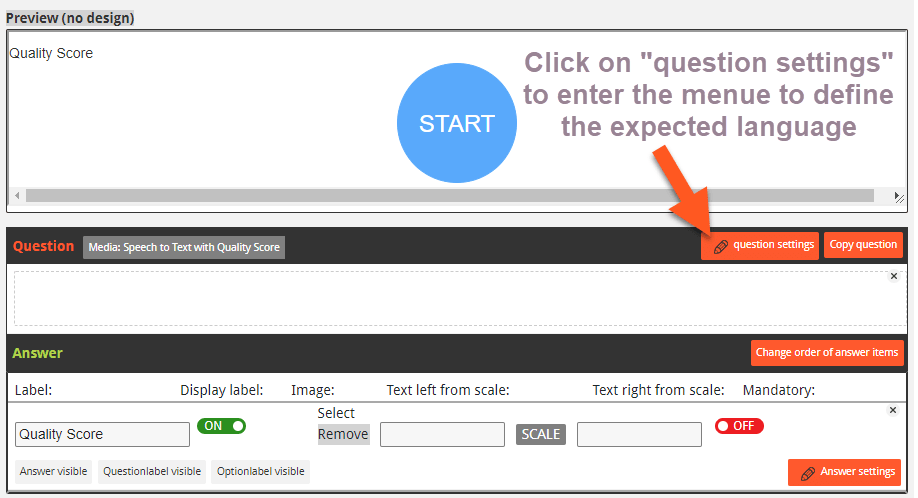
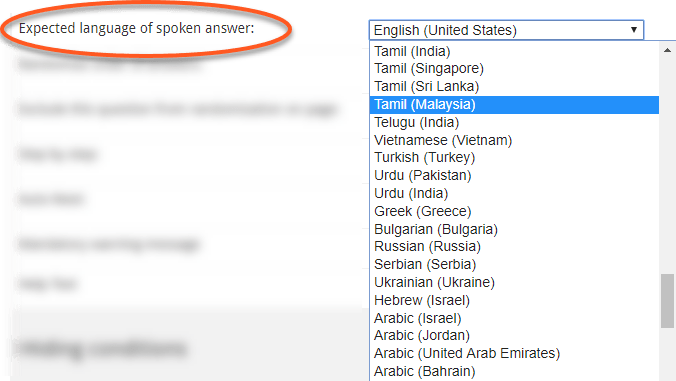
Using speech in research still requires some technical tests upfront, but is a fantastic new feature and broadens the opportunities of research. We will continuously work on these feature sets and support the world with more and more pangea ideas soon.
How to analyze speech?
The voice of a person is transcribed into written text in questfox. As an option you can save the spoken word as an audio file. At the moment questfox will only offer you a look at the data but is not providing any specific analytic tools for voice or text. Little by little we develop these analytic parts together with software partners specialized in that field of research. Over time more and more partners will be able to offer analytic tools in their specific language. That is the return of the supercontinent pangea.
#questfox major update alert: 41 languages supported by questfox speech module for research #therealvoiceofthecustomer
Posted: 7. October 2019 Filed under: Speech2Text, Uncategorized | Tags: speech in research Comments Off on #questfox major update alert: 41 languages supported by questfox speech module for research #therealvoiceofthecustomer
We know that the answer to all questions of the universe is 42. And we are getting there soon and even beyond. In our constant development towards new forms of research interaction we are integrating more and more languages into questfox.
At this point in time we managed to integrate 8 different languages with their respective versions spread around the world. See our interactive map of supported languages
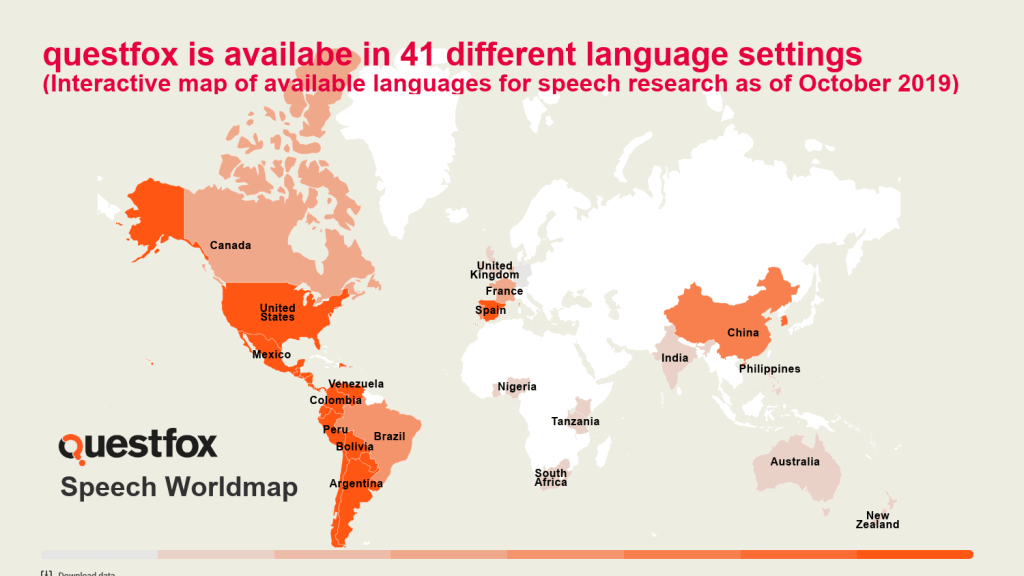
We are well aware of the fact that this only the beginning. We need to integrate the needs of the entire planet in order to bring continents back together again. We are pangea labs and we are establishing one world of understanding with no boarders in our minds.

By now we group these functions under “Multimedia Insights”. Perhaps it is even time for a new paradigm in asking questions. Research will not remain the same when using speech.
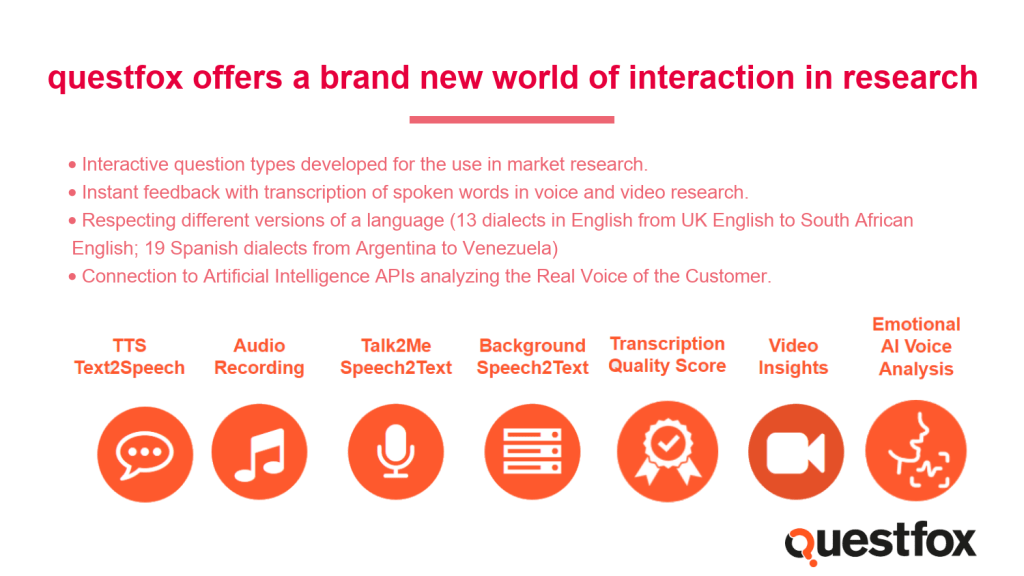
We are looking forward to your suggestions about the use of speech in research. Contact us under info@questfox.com



Links in questfox. Personalized, anonymous or QR Code?
Posted: 24. July 2019 Filed under: Uncategorized Leave a commentquestfox offers a lot of opportunities to individualize the interaction with respondents. The email invitation is a standard procedure that is based on a created link. Links can be general (everyone uses the same link) not allowing to control for participation and not able to prevent multiple participation or personalized.
A personalized link has the feature of being able to continue the questionnaire at the last answering page in case someone did not finish the survey and wants to continue some other time. It is also possible to only allow participation with individual links.
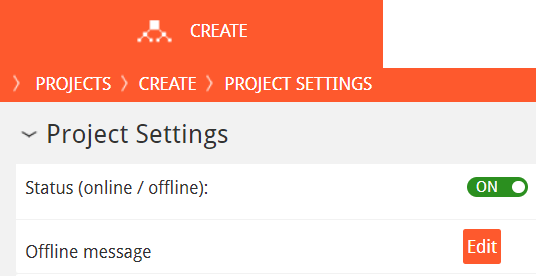
questfox is able to shorten links. There are several options to do this. Under Create Re-Direct Links you can create a shortened link. In case you need personalized links there is the feature of creating a list of anonymous (because the system questfox does not know where this link is going to be used) links and then download a csv file. One can then use the serial letter functions in Outlook to send out an email with very individual links.
By the way: The questfox links are not the shortest ones on the internet. Also questfox does not mean a lot to the people out there. So it may be an idea to use an additional link shortener in which you make the questfox shortlink even shorter. We used to use goo.gl (which was stopped by Google) and now really enjoy www.bit.ly (professional version requires payment). A nice initiative in Germany even sends a political message with their link shortener against NAZIS. See https://fckaf.de/
Hybrid versions of the link structure are also common. A client recently generated 80 general links to be spread in his 80 branches and 2000 individualized links for his employees. For the 80 links the client needed 80 different QR Codes.
We had the task to generate 80 QR Codes and found this marvelous template from Tammy Worcester which allows to integrate your questfox links and automatically generates as much QR Codes as you need. The template runs of Google Tables and is available here. Thank you Tammy!
It is a bit tricky to play around with the formats, but if you stay online with chrome you can easily use this template. In questfox you can then see the participation rate of each link. If you download the list again the status of the participants may have change into completed, droped-out etc.
Settings to the Slider/Handle on a questfox graphical scale
Posted: 25. June 2019 Filed under: Uncategorized Leave a commentquestfox works with a standard slider/handle on each graphical scale starting on the left side. You can change those settings following these instructions.

First: One can manipulate the starting point of the transparent slider by defining a custom slider starting point. Switch the setting to ON and define the number where you wish the slider to be at the start.

The results looks as such:

Until someone ticks one the scale the data is still a missing value as defined in your scale. If someone clicked, the value is set to the nearest scale point of the BACKGROUND definition of your scale.

Remember: The graphical scale is just a trick. The real values of the scale are the ones defined under “edit answer values”. Make sure that your graphical scale always corresponds to the real values as defined. The standard questfox scales do exactly correspond to this precise definition.
Some users reflect on the answering process using questfox stating, that the semi-visible answer handle may already influence respondent’s answering behavior. We are working on that issue.
questfox feature alert: Speech2Text Emotional Voice Analysis
Posted: 25. May 2019 Filed under: Multimedia Insights, Speech2Text | Tags: API, audEERING, Emotional Scan, questfox Leave a commentWe are very excited to announce the integration of an application programming interface (API) inside of questions. questfox is partnering with audEERING and their emotion analysis engine based on speech analytics. questfox is now offering a permanent link to the incredible innovative audio analytics tool from audEERING (Munich).
Some questfox users already have access to a new question type called Speech2Text Voice Analysis. The question type is available for some users under Multimedia Insights.
The question type is basically a speaking answer question type (with all the restrictions still in practice*), where the transcript is generated based on the audio file. On top of this functionality, the audiofile is sent via API to audEERING to the check for emotional patterns in the voice answer. Within seconds questfox is able to receive the answer in the form of numbers assigned to different emotional states of a person. These values are saved inside the question type and kept in the background for export or other purposes. For example they can be used right away used for different actions during the live Interview. The values are exported alongside other data in the export file.
At the moment we are still testing the performance of the integrated API inside a survey tool. After additional tests runs, this emotional tracking opportunity will allow totally different kinds of research.
This new function is not included in the standard questfox software package as it causes additional cost anytime it is used. After a defined testing time we will define the pricing for this fabulous new feature set. Little by little we will create templates of ideas how to use emotional tracking in the interview process. We are also looking forward to see our users fantastic ideas come to life with this new set of opportunities.
We are looking forward to see new forms of research with the integration of the cognitive API inside the survey tool questfox. There may be more cognitive services connected to questfox in the future. We strongly believe in the power of expert knowledge from different fields of expertise. We will continue developing new standards in the world of interviewing as our field of expertise. The new technology allows us to connect several best-in-class approaches in one tool. The innovative tool allowing this open world of connected intelligence is still questfox.
*Restrictions when using voice type questions inside of questfox.
Years ago we made the decision not to develop an app for questfox as this would restrict our users around the world. We still believe that the effort needed for users to download an install an app for market research hardly pays off. This is why we opted for an open approach based on internet browser technologies. The negative side of this is that even in 2019 it is difficult to get voice answers from a series of browsers who do not allow the usage of a microphone in a browser. The biggest obstacle here still is Apple who does not allow to use a microphone in a browser situation on their devices. We strongly recommend a technology funnel in your suvey filtering out the users of iOS and some outdated browsers like Internet Explorer. Good news: Even Microsoft got the message right and the new version of Microsoft Edge is able to work with microphone. We know that it will still take years before 100% of a population can be researched with this approach. For the time being we have to live with the 70% of users who can actually be interviewed with this technology.
An indicator whether this is possible can be found here https://caniuse.com/#search=mediastream

New question type Speech2Text Quality Score
Posted: 3. May 2019 Filed under: Multimedia Insights 1 Commentquestfox is fully into Speech.
In order to learn more about the quality of the transcriptions possible, we integrated a new speech type with the only job to check for the quality of the audio transcript. The new question type is available under “Multimedia Insights” with the label “Speech2Text Quality Score”.
Integrating the speech-to-text Quality Score allows you to use a simple test for the quality of the audio transcription. The result is the score comes out between zero (no quality) and 1 (perfect quality). The higher the score, the better the quality of the transcript. Before using live transcription in an interview situation, we recommend to have at least 0.7 in quality or above.
If the quality score falls below 0.5, we recommend to not use Audio transcription features in your project. Reason for a bad score could be the overall sound environment of the recording situation or the poor expression quality of the speech of an individual.
By using questlogix, you can steer a participant through the interview by not allowing voice functionalities in the interview situation.
At the moment we recommend to save the quality score along with the data to learn more about your respondents and their technical setting. Looking at the potential base of users being able to use speech on their device, more than seventy percent of the worldwide internet population should technically be available to participate in such a voice study. But in reality the feasibility of speech technology falls way behind those wishful numbers. Integrating the quality score will help you understand your speech in research opportunities better.
By the way: we do not record whatever people say under this quality score question. You can change the sample sentence that people should use in this question type into whatever you would like to.
You can also use the outcome as a variable in the ongoing interview by showing the score or using it as a trigger for a questlogix.
Explanation to better understand the Transcription Confidence Score
| Score | Rating | To Do |
| above 0,9 | very good | just go on with your project |
| 0,8 – 0,9 | good | no need do change anything |
| 0,7 – 0,8 | acceptable | reduce background noise |
| 0,6 – 0,7 | usable with caution | check microphone |
| 0,5 – 0,6 | not acceptable | re-position microphone/person |
| 0 – 0,5 | very bad | do not use AUDIO functionality |
How to download the original audio or video files from questfox?
Posted: 26. April 2019 Filed under: Multimedia Insights Comments Off on How to download the original audio or video files from questfox?How to download the original audio or video files from questfox?
This post is only valid for the data captured until October 2020. Since November 2020 we will no longer store multimedia files on our servers. Read the details on how to connect your project with your own SFTP client here: https://questfox.wordpress.com/2020/11/01/clients-sftp-server-integration-for-audio-files/
questfox allows you to record audio and video files. Usually these are immediately transcribed and saved as text, but there is also the option to save the spoken word or recorded video as a multimedia file on the questfox server.
It should be noted that the use of multimedia recordings generates huge amounts of data that go far beyond what is common in market research. A 10 second video usually generates more data than the survey of 1000 people answered by click and text.
Of all types of recording, automatic transcripts are saved as text. But it will always be necessary to hear or view the files in their original format. This memo explains how to do this with the questfox Filemanager.
Each page created in the questfox with audio or video files is saved in its own folder, which contains the name of the project in coded form. Within a folder there are then the respective pages in the continuous numbering. So if an audio file is saved on page 5, then it can be found in the folder Q5. The file folders are only created with the first saved Multimedia element. If you still change the folder structure in the running project, even though audio data has already been received, a little caution is required, as questfox always writes into the current folder.
From the folders you can download the files individually or collectively. While this is comparatively easy with audio data, special considerations have to be made especially for video files. Overall, the question is whether the amount of data is too large to be downloaded in a browser session download. Almost every browser lets you down in case of hundreds of megabytes. For these cases, we offer a separate access to the files, which is realized with a kind of FTP tool. For the vast majority of users, the download is readily possible.
So here’s the way to the audio data of your project:
At the top level, select the Project Space and select the File Manager

Click on the folder “Survey Uploads”

There select the project. To do so one must know the questionnaire ID, which is assigned to the folder. The survey ID is the code that can be found behind the questfox link in the project overview (in the red box BID = CODE OF THE SURVEY).

In questfox File Manager there is then a separate folder per ID.

When opening this folder, various folders may be displayed, each of which may contain audio or video data. The arrangement is in the numerical order of the questionnaire.
With a right mouse click you can open the menu and save the data first as Zip and then right click on Download to download it to your device as ZIP. Please note that you must have the appropriate permits from the people who you recorded before using the data in a different context.

If there is little data, usually a whole project can be downloaded at once. With extensive data, there are sometimes difficulties with videos here. In these cases, we offer direct access to these folders via our own tool (similar to ftp). Ask your questfox partner about this feature,
Attention: The data can be so extensive that the browser session does not allow the download and stops without error message.
The file names themselves are coded and contain an indication of the format at the end. Voice stands for voice files. Video for motion picture files.


Depending on the source device different formats are written. questfox currently has the ability to encode in .ogg and .webm.
If you have difficulty playing the files, we recommend the VLC Player, which handles more than just the proprietary formats of some producers. Download at https://www.vlc.de/
In the hope of enabling new ways of voice and video interviews. Good luck with the new survey options inside of questfox.
Pretty soon there will be an update allowing you to take care of your upload folder on your side. We will offer the option to use your personal SFTP Server.
Update November 2020: This is how you connect to SFTP: https://questfox.wordpress.com/2020/11/01/clients-sftp-server-integration-for-audio-files/
Simplifying teamwork with testing comments
Posted: 8. April 2019 Filed under: Uncategorized Leave a commentFor years already teams are using questfox with the opportunity to leave user comments underneath each question page.
We just added a feature simplifying your work with the new opportunity of looking at all comments in one place while allowing to edit the comments.
Under “Create Settings” you can now see “Show Test Comments” where you can right away edit the comments to a project. Some users also wished for a printing opportunity which you now have by printing the new overview page.
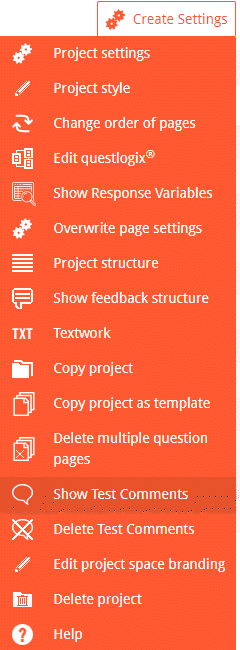
As all comments are copied together with a project the function “Delete Test Comments” still make sense. Hoping to improve your project work with this little non-research related feature.
questfox is an award winning software now
Posted: 8. April 2019 Filed under: Speech2Text, Technology | Tags: GOR Leave a commentThe questfox development team is part of the research team that could win the best practice award 2019 of the DGOF (German Society for Online Research) with the study
„Automation of the Real Voice of the Customer.
Use of massive audio and video interaction in online interviews“
Using the new questfox features of voice and video recording with completely automated transcriptions, the jury found the approach worth award the prestigious best practice award.
For us this is a great honor, having achieved this with our innovative way of enabling research. There is more to come, but we will always depend on researchers integrating our ideas into their projects.
Thanks to Holger Lütters and HTW Berlin, thanks to Malte Freksa and GapFish and thanks to Marc Egger and insius for making this possible together with us.
If you could not make to the presentation, here it is again:
Best Practice Award Competition Presentation at GOR2019
 questfox News